Choose Directory when you need ordinary files such as installer ISOs,
container templates or backup archives. Consider LVM-Thin for local guest
disks with thin provisioning and snapshots. Choose local ZFS (zfspool)
when you want Proxmox to manage guest disks through a ZFS pool, with its
snapshot and cloning capabilities. A host can use more than one of these.
Start with what each storage must hold, then decide which disk failures and recovery operations the design must handle. A storage name alone does not answer either question.
This comparison checks the official documentation sources against the pve-docs 9.2.13 changelog, reviewed on November 3, 2026. It is a planning guide, without hardware benchmarks or a tested migration procedure. Check the documentation shipped with your installed version before changing storage.
Compare the Proxmox backend, not just the disks beneath it
A Proxmox storage entry combines an ID, a backend type and enabled content
types. Names such as local, local-lvm and local-zfs are IDs; the backend
determines what Proxmox can do with them. The
storage manager documentation
shows the different entries an installer can create.
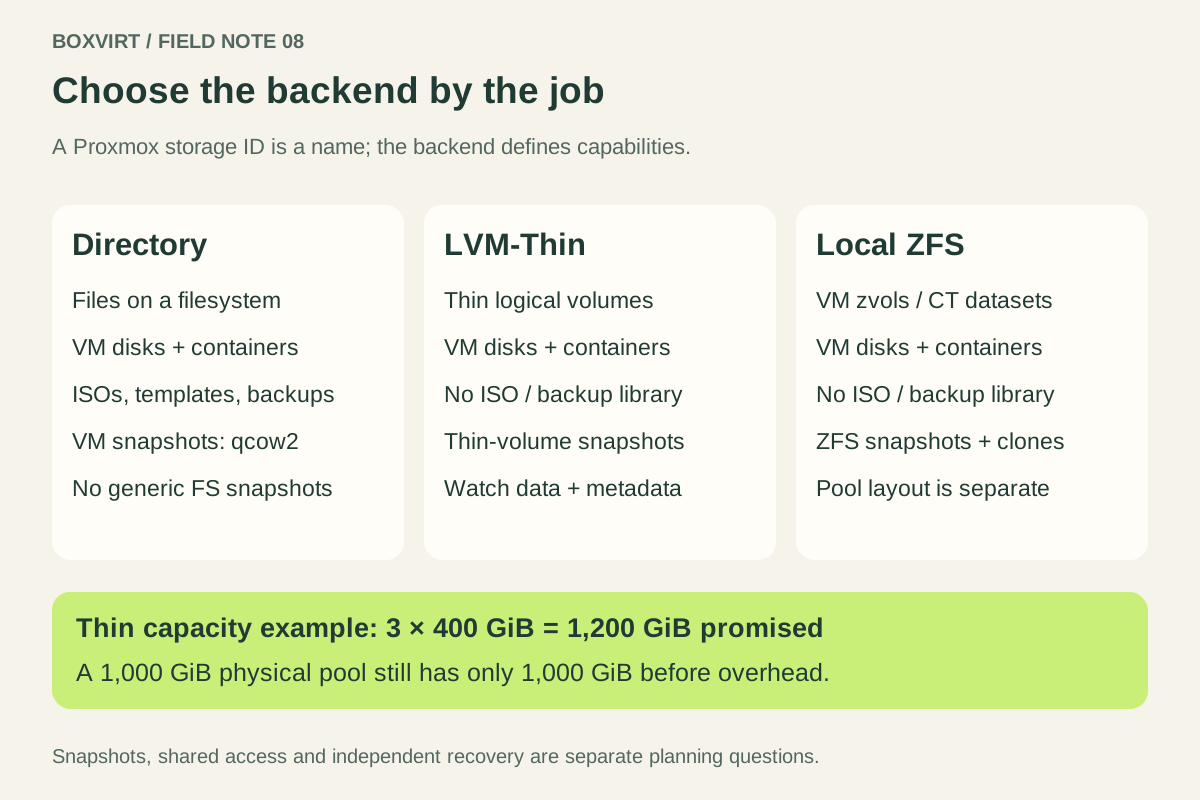
| Question | Directory (dir) | LVM-Thin (lvmthin) | Local ZFS (zfspool) |
|---|---|---|---|
| How are guest disks represented? | Files on a filesystem | Thin logical volumes | VM zvols; container filesystem datasets |
| Guest disks and container data? | Yes, when enabled | Yes | Yes |
| ISOs, container templates and backup archives? | Yes, when enabled | No | No |
| Snapshot mechanism | VM qcow2 image capabilities; see caveats below | Thin-volume snapshots | ZFS snapshots |
| Linked clones? | With qcow2 | Yes | Yes |
| Shared between nodes by default? | No | No; local only | No; local backend |
The underlying filesystem and the Proxmox backend are separate choices.
A Directory entry pointing into a mounted ZFS filesystem remains a dir
entry. It does not acquire every feature of zfspool just because its files
sit on ZFS.
Directory: flexible content, with image-format caveats
The Directory backend uses a POSIX-compatible directory. Check enabled content types if an entry does not appear as an ISO upload target.
Directory supports VM snapshots with qcow2, rather than generic filesystem-level snapshots. Do not extend that claim to raw image files or container root directories. A raw file and a raw block volume on another backend are different cases.
A Directory entry can hold the ISO library while another backend holds guest disks. There is no requirement to force everything into one entry.
LVM-Thin: local guest volumes, not a file library
The LVM-Thin backend allocates physical blocks as volumes are written. It supports VM images and container data, snapshots and clones. It cannot act as an ISO or backup-archive directory, and Proxmox documents it as local storage that cannot be shared between nodes.
Thin provisioning separates the size promised to a guest from the physical space consumed. For example, three 400 GiB guest disks promise 1,200 GiB. Placing them in a 1,000 GiB thin pool does not create another 200 GiB of physical capacity. A low usage figure today is not proof that all three can fill tomorrow.
Monitor both data usage and metadata usage. The upstream LVM thin-provisioning manual explains the two limits and why shared snapshot blocks can keep space allocated. Removing files inside a guest is not, by itself, evidence that the host has reclaimed that space. Plan room for growth and snapshot retention before promising more capacity.
Local ZFS: guest volumes managed through the pool
The local ZFS backend
uses zvols for VM disks and ZFS filesystem datasets for containers. Both have
backend snapshot and cloning support. The sparse option controls ZFS thin
provisioning; do not infer reservation behavior from the word “ZFS” alone.
The plugin accepts guest images and container data, rather than arbitrary ISO or backup files. Keep a separate file-storage entry when you need those content types.
Choosing zfspool also leaves a separate pool-layout decision. A single-disk
pool, mirrors and RAIDZ have different capacity and disk-failure properties.
Use the ZFS usable-capacity guide
for space planning and the RAIDZ2 versus mirrors comparison
for one explicit six-disk example. A backend name does not specify redundancy.
Keep snapshots, shared storage and recovery separate
Snapshot claims need a version and a mechanism. Since Proxmox VE 9, the LVM backend documentation describes VM snapshots as volume chains. It currently labels that feature a technology preview, and the option affects newly created virtual disks. Consequently, “ordinary LVM can never snapshot” is an outdated blanket rule. LVM and LVM-Thin still remain different backends.
The current storage overview also distinguishes internal qcow2 snapshots from volume chains. Internal qcow2 snapshot creation and deletion can block a running VM, particularly with large images on network storage. A “snapshots: yes” cell is insufficient to plan a maintenance window.
Shared storage means nodes access the same data. A shared configuration entry
or matching storage ID does not make local volumes shared. Proxmox’s shared
flag describes storage that is already shared; it does not distribute files.
A snapshot on the same failed storage cannot supply the missing data. Two entries backed by the same physical pool also share that pool’s failure boundary. Write down which independent copy survives losing the host or pool, using the Proxmox backup and restore checklist to plan recovery.
Fill out a storage worksheet before choosing
Consider a single host with two Linux VMs, one container and an ISO library. The initial question is where each item belongs, rather than which backend wins an overall ranking.
| Item to plan | Decision to record |
|---|---|
| ISO library and container templates | Which file-storage entry holds them? |
| VM disks | Which backend, image format and snapshot mechanism will each use? |
| Container root data | Does that backend support the required container operations? |
| Capacity | What is physically available, promised to guests and reserved for growth? |
| Snapshots | How long are they retained, and how will their space be monitored? |
| Node or pool loss | Where is the surviving recovery copy? |
If the installer already provided Directory plus LVM-Thin and those satisfy
the answers, there is no need to replace them merely to simplify the storage
list. If ZFS is a deliberate requirement, record the pool layout, guest
allocations and file-library location before building around zfspool.
Keep the completed worksheet with the wider Proxmox homelab plan. It gives you a reason for each storage entry, an explicit space budget and a recovery dependency you can verify later.
For a complete host plan, pair the disk worksheet with the Proxmox RAM budget. If the disks belong to a NAS guest, first decide who owns its storage controller.