
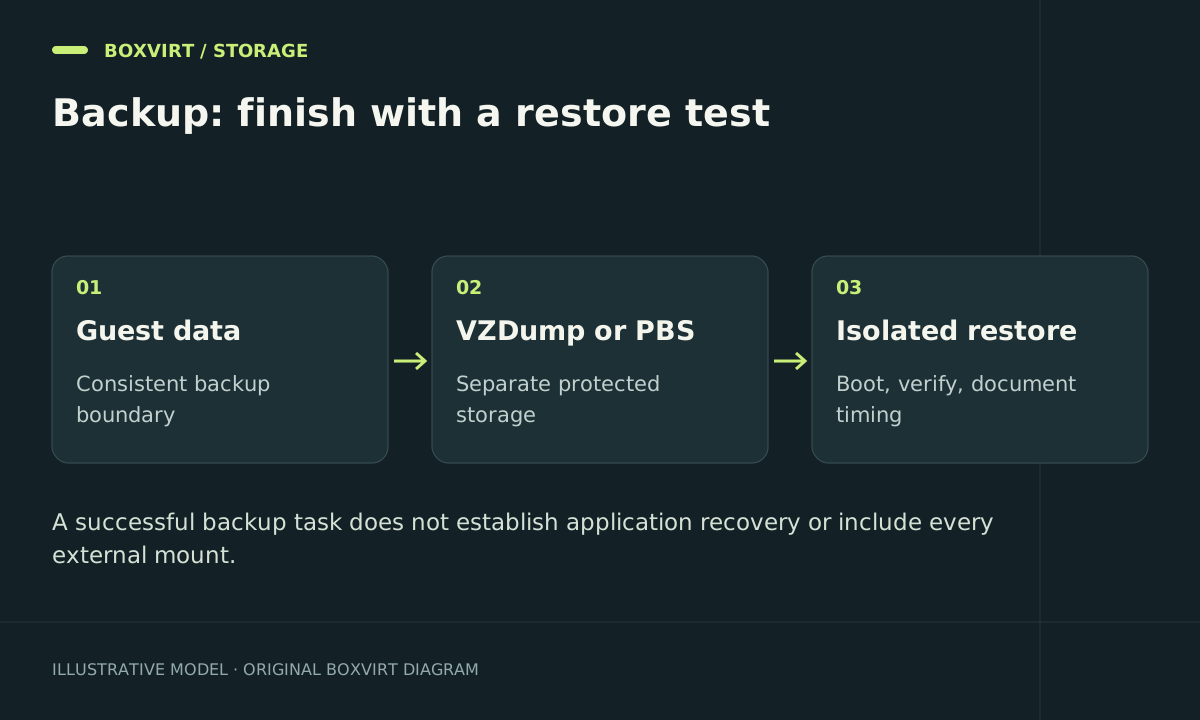
Use Proxmox guest backups to recover a VM or container, and test that recovery before depending on it. VZDump can write backup archives to configured storage; Proxmox Backup Server provides a dedicated backup service with deduplication and its own verification and maintenance tasks. Neither removes the need to identify external data and prove that the application starts after a restore.
The commands below illustrate the documented backup and restore interfaces. They require a disposable guest and an isolated restore target; no completed application recovery is claimed for this draft.
Define what you must recover
Set a recovery point objective: how much recent data can you afford to lose? Then set a recovery time objective: how quickly must the service work again? A daily job may fit a one-day data-loss target, but only a timed restore can tell you whether the downtime target is realistic.
Inventory the guest disks, databases, container mount points, network shares, secrets, and encryption keys. Proxmox documents that LXC bind mounts and device mounts are never included in the container backup. Additional storage-backed mount points need the appropriate backup inclusion setting. This is especially important for services such as Nextcloud in an LXC container, where the data directory may live outside the root disk.
For databases, choose an application-supported consistency method. A filesystem-consistent backup and an application-consistent database recovery are different claims. Guest-agent integration can help coordinate VM filesystem operations, but it does not prove every application is recoverable.
Choose the destination and maintenance model
| Approach | Useful when | Additional responsibility |
|---|---|---|
| VZDump archive on configured backup storage | You want straightforward guest archive files | Capacity, retention, independent copies, archive restore tests |
| Proxmox Backup Server | You want a dedicated backup system with deduplicated storage and scheduled verification | PBS availability, credentials/keys, verify jobs, prune, garbage collection, restore tests |
A PBS VM on the same host and disks as its protected guests still shares that hardware failure boundary. Keep a protected copy you can access after losing that host. Use restricted credentials where supported and preserve encryption recovery material somewhere independent of the system it protects.
The RAID / ZFS Calculator estimates nominal disk layouts, not backup retention. Measure backup growth from your actual data changes, compression, and retention policy. Avoid assuming that a changed file adds exactly its full size to every deduplicated backup.
Make one backup and inspect the result
Suppose guest 101 is a disposable VM and backup-store is a configured storage ID with backup content enabled. Confirm the identity and destination first:
qm config 101
pvesm status
Then create an example archive backup:
vzdump 101 --storage backup-store --mode snapshot --compress zstd
pvesm list backup-store --content backup
Do not substitute a production guest without reviewing its backup exclusions and consistency requirements. Snapshot mode describes the backup operation; it is not a guarantee that every guest application needs no further preparation. Keep the full task result and inspect warnings, excluded volumes, and destination space.
After that test, configure a scheduled job with explicit guests, a destination, suitable timing, retention, and notifications. A configured email destination is not sufficient until a test notification is actually received.
Restore under a new ID without joining production
Choose an unused ID such as 901, adequate destination storage, and a bridge with no unintended route into production. Disable unattended start behavior until networking is reviewed. Never test by overwriting the only running copy.
For an archive-backed VM, the restore command takes the archive first and VM ID second:
qmrestore /mnt/backup/vzdump-qemu-101-EXACT-TIMESTAMP.vma.zst 901 --storage local-lvm
qm config 901
The path and timestamp are placeholders for your actual completed archive. PBS backups use their storage volume/snapshot identifiers and supported restore workflow; they are not .vma.zst files to download by guessing a pathname.
Before booting, disconnect the restored NIC or attach it to the intended isolated bridge, inspect all NICs and any static addresses inside the guest, and prevent duplicate scheduled jobs. For a container, use the separate pct restore interface and review restored mount-point dependencies.
Boot the restored guest and test a real application operation. Check a recent database record or file, permissions, authentication, and required secrets. Measure from the start of restoration to usable service, including manual steps. Record what was missing rather than marking a boot screen as complete recovery.
Keep PBS maintenance distinct from application recovery
Verification checks stored backup data; a restore test checks your ability to use it. Pruning removes selected snapshots according to retention, while garbage collection reclaims chunks that are no longer referenced and meet the relevant safety conditions. Schedule and monitor each task according to the installed PBS documentation.
If a restore fails, preserve the original backup and task logs, check target capacity and storage compatibility, then investigate missing external data or credentials. Avoid altering the only backup to make a test succeed. Return to production only after explicit network and application checks.
Planning tools
Use the transfer time calculator to estimate how long the expected backup payload will cross a link, or work backwards from a target recovery window. Use observed transfer rates and distinguish network time from storage and application recovery time.
Frequently asked questions
Is a local snapshot a backup?
It can help reverse some changes, but it depends on the underlying storage remaining available. Keep an independent recoverable copy for pool or host loss.
Are LXC bind mounts included automatically?
No. Their contents need a separate data protection plan. Review storage-backed mount points individually as well.
Does a PBS verify job replace a restore test?
No. Stored-data integrity does not prove application consistency, key availability, correct network configuration, or a workable recovery time.
What should a restore record contain?
Record the backup identity, guest/application versions, destination, network isolation, checked data, missing dependencies, elapsed time, and the administrator who verified the result. Repeat after meaningful changes.