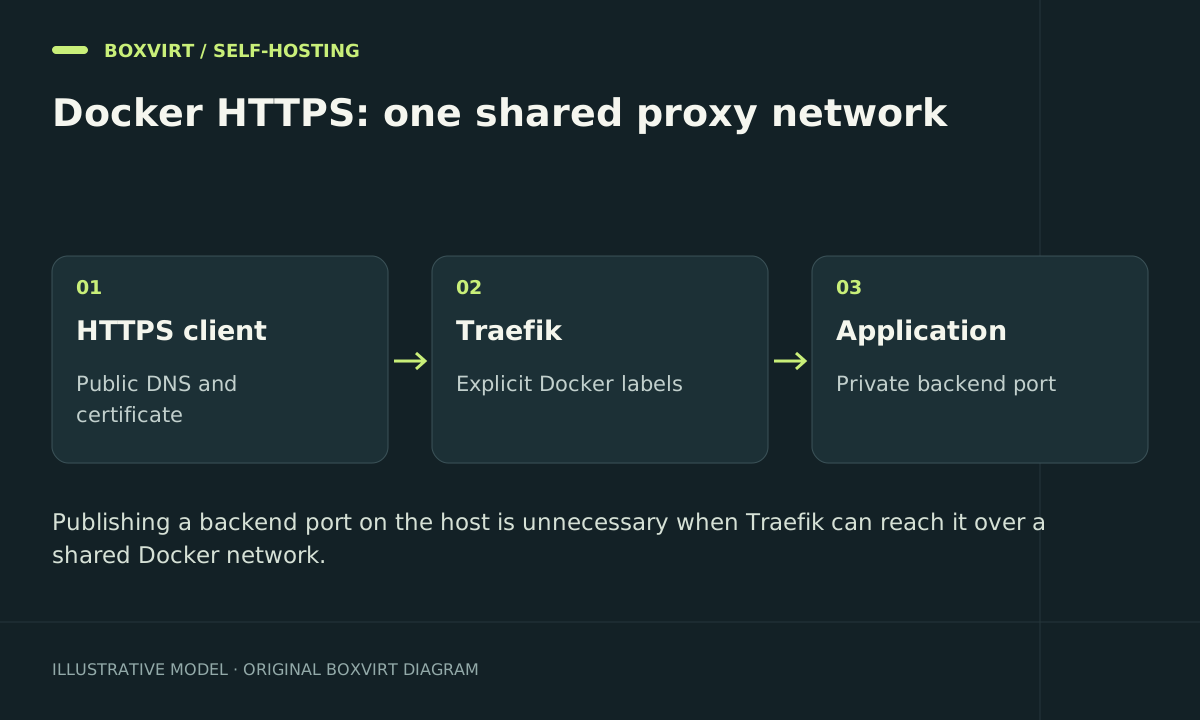
For Traefik HTTPS on one Docker host, place the proxy and intended applications on a shared network, disable automatic exposure, and give each router a TLS certificate resolver. With Cloudflare DNS-01, keep the DNS token in a private file and persist ACME state outside the container.
The worked template below uses a disposable whoami test application. It deliberately requires you to choose exact image references, a real hostname, a contact email, and the ACME environment before starting. It does not expose a dashboard or Docker TCP API.
Understand the trust boundary
Only Traefik publishes ports 80 and 443. The test app has no host port; Traefik reaches its container port 80 over the shared network. Keep databases off that proxy network unless an application-specific design requires otherwise.
The example gives Traefik direct access to the local Docker socket for discovery. That grants powerful Docker API access, even with a :ro mount; the mount flag does not filter API operations. Use it only on a host where you accept that trust boundary. The remote discovery guide explains alternatives and authentication limits. A standalone file-provider proxy can avoid Docker daemon access.
Prepare exact inputs and private files
Choose a maintained Traefik v3 release and a specific traefik/whoami release or digest. In a project .env file, set TRAEFIK_IMAGE, WHOAMI_IMAGE, TEST_HOST, ACME_EMAIL, ACME_CA_SERVER, and ACME_STATE_FILE. The image values must be full references you have verified, not the variable names or a moving latest tag.
Set TEST_HOST to your real subdomain, such as demo.example.com, with DNS pointing to the intended ingress. Example domains in this guide are placeholders.
Create secrets/cloudflare_dns_token containing a Cloudflare API token scoped to the required DNS zone, with the permissions documented by Lego’s Cloudflare provider. Use zone-scoped DNS Edit and Zone Read, or the documented split-token design when appropriate. Do not substitute an account-wide API key.
Prepare the private directories and files:
mkdir -p secrets acme
chmod 700 secrets acme
Create the token file privately inside secrets, then run chmod 600 secrets/cloudflare_dns_token. Do not paste its value into a shell command, label, or repository. Local Compose secrets mount a host file; they do not make that host file an encrypted secret store. Protect its backup and the Docker host too.
Create a same-host Compose stack
Save as compose.yaml:
services:
  traefik:
    image: ${TRAEFIK_IMAGE:?Choose an exact Traefik v3 image reference}
    restart: unless-stopped
    command:
      - --entrypoints.web.address=:80
      - --entrypoints.web.http.redirections.entrypoint.to=websecure
      - --entrypoints.web.http.redirections.entrypoint.scheme=https
      - --entrypoints.websecure.address=:443
      - --providers.docker.endpoint=unix:///var/run/docker.sock
      - --providers.docker.exposedbydefault=false
      - --providers.docker.network=traefik-demo-proxy
      - --certificatesresolvers.dns.acme.email=${ACME_EMAIL:?Set your contact email}
      - --certificatesresolvers.dns.acme.caserver=${ACME_CA_SERVER:?Choose staging or production}
      - --certificatesresolvers.dns.acme.storage=/acme/${ACME_STATE_FILE:?Choose a state filename}
      - --certificatesresolvers.dns.acme.dnschallenge.provider=cloudflare
    environment:
      CF_DNS_API_TOKEN_FILE: /run/secrets/cloudflare_dns_token
    secrets:
      - cloudflare_dns_token
    ports:
      - "80:80"
      - "443:443"
    volumes:
      - /var/run/docker.sock:/var/run/docker.sock:ro
      - ./acme:/acme
    networks: [proxy]
  whoami:
    image: ${WHOAMI_IMAGE:?Choose an exact traefik/whoami image reference}
    restart: unless-stopped
    networks: [proxy]
    labels:
      traefik.enable: "true"
      traefik.docker.network: "traefik-demo-proxy"
      traefik.http.routers.demo.rule: "Host(`${TEST_HOST:?Set your real hostname}`)"
      traefik.http.routers.demo.entrypoints: "websecure"
      traefik.http.routers.demo.service: "demo"
      traefik.http.routers.demo.tls.certresolver: "dns"
      traefik.http.services.demo.loadbalancer.server.port: "80"
networks:
  proxy:
    name: traefik-demo-proxy
secrets:
  cloudflare_dns_token:
    file: ./secrets/cloudflare_dns_token
Use a dedicated test environment with free ingress ports; do not start this beside an existing proxy already binding them. Confirm the network name does not collide with another stack.
The token file mechanism is documented by Lego and Docker Compose secrets. The Traefik routing reference describes explicit service and port selection.
Test certificate issuance before production
Initially set these .env values:
ACME_CA_SERVER=https://acme-staging-v02.api.letsencrypt.org/directory
ACME_STATE_FILE=staging.json
Create the selected state file privately:
touch acme/staging.json
chmod 600 acme/staging.json
docker compose config --quiet
docker compose pull
docker compose up -d
docker compose ps
Inspect issuance errors locally. Check token scope, authoritative DNS, and challenge propagation. Do not disable DNS propagation checks to hide a wrong-zone credential.
A Let’s Encrypt staging certificate is intentionally untrusted by ordinary browsers. Confirm staging issuance through protected logs/certificate inspection; do not send credentials or teach clients to ignore TLS errors.
After successful staging issuance, change ACME_CA_SERVER to https://acme-v02.api.letsencrypt.org/directory and ACME_STATE_FILE to production.json. Create that file with mode 0600, then apply docker compose up -d again. Keep the staging and production state separate rather than deleting existing production certificates to force retries.
Verify the complete HTTPS path
With your real hostname substituted:
curl --head http://demo.example.com
curl --head https://demo.example.com
Expect an HTTPS redirect from the first request and a valid certificate plus the intended app from the second. Inspect the certificate names and expiry. If Cloudflare proxying is enabled, a normal browser checks the edge certificate; independently verify the origin TLS endpoint using your real origin address and the correct hostname, without skipping trust validation.
Replace the disposable app only after testing routing. For example, Audiobookshelf has its own persistent storage and WebSocket needs, while Linkwarden needs database and archive recovery.
Retain private ACME state, configuration, image identities, and application backups before upgrades. Monitor expiry and issuance failures; an initially issued certificate is not evidence that a later renewal has succeeded.
Frequently asked questions
Does DNS-01 require a publicly open port 80?
No. It validates control using DNS records. Port 80 in this example serves the HTTP redirect; actual client access still needs a route to HTTPS. HTTP-01 has different reachability requirements.
Why does Traefik return 404 even though the container is running?
Check the requested hostname, entrypoint, labels, provider logs, and opt-in label. An unmatched router is different from a matched route whose backend cannot be reached.
Why does the router work but return 502?
Check the shared network, actual network name, and application listener port. Labels select the container port, not a host port from an unrelated mapping.
Can I delete acme.json to fix certificate problems?
Do not delete active certificate state as routine troubleshooting. Diagnose the challenge, permissions, and resolver configuration, and use separate staging state for experiments.