To build VLANs on OPNsense, create a VLAN interface on the correct physical parent, carry the same tag across the switch trunk, and give each VLAN its own subnet and gateway. Then configure DHCP, DNS and firewall policy. Creating the VLAN alone does not decide which routed connections are allowed.
Validation: This is an illustrative three-port lab, reviewed against documentation on November 11, 2026. It has not been configured or tested on hardware. WAN, management and the VLAN trunk use different firewall ports. A one-port design or a migration of the current management network needs a different plan. Record the exact OPNsense build, NIC identities, switch model and firmware.
Keep management separate while building the trunk
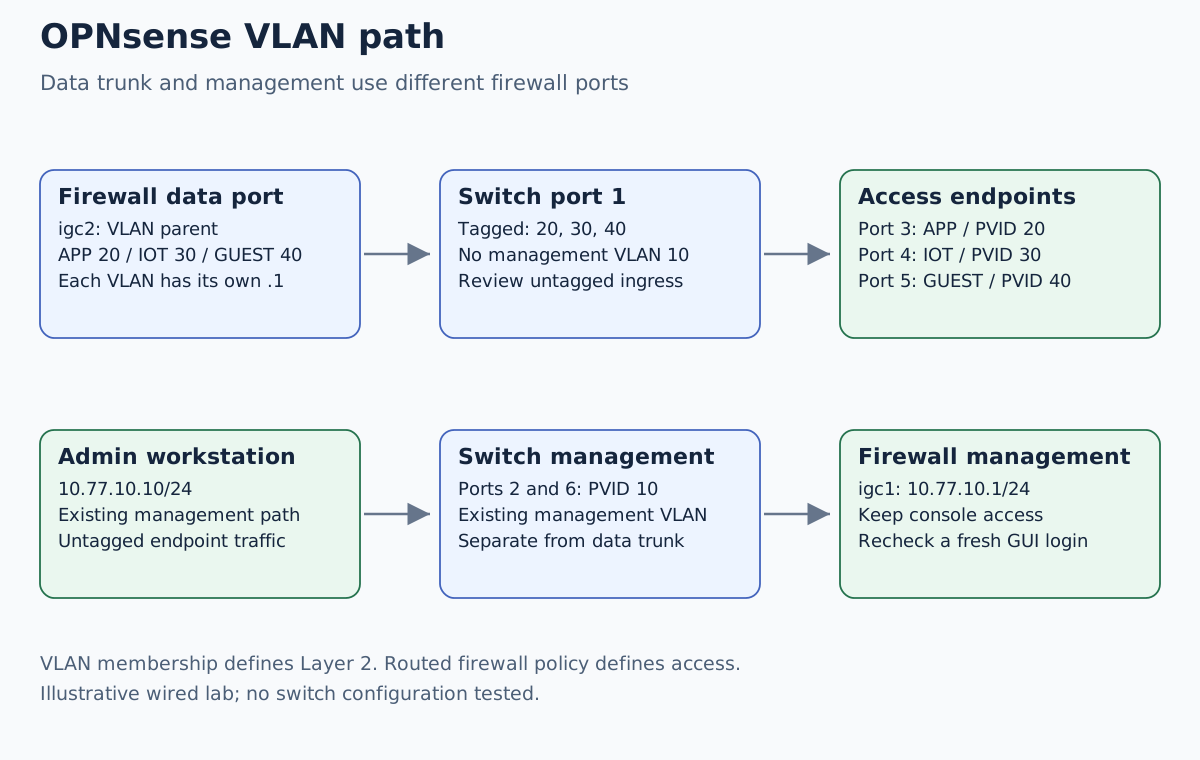
Our existing management LAN is 10.77.10.0/24. OPNsense has
10.77.10.1/24 on igc1; an admin workstation is 10.77.10.10.
The dedicated VLAN parent is the verified spare port igc2.
Interface names are examples: identify your own ports by MAC and cable path.
| Network | Tag on firewall trunk | OPNsense address | Client assignment |
|---|---|---|---|
| Existing MGMT | Not carried | 10.77.10.1/24 on igc1 | Existing management configuration |
| APP | 20 | 10.77.20.1/24 | Static application 10.77.20.50 |
| IOT | 30 | 10.77.30.1/24 | DHCP 10.77.30.100–10.77.30.149 |
| GUEST | 40 | 10.77.40.1/24 | DHCP 10.77.40.100–10.77.40.149 |
These private subnets must be free of conflicts with existing LANs, WAN, VPNs and remote sites. This example leaves APP on static addressing and uses DHCP only for IoT and guests. Each range contains 50 addresses; neither includes its gateway, network address or broadcast address.
Export a protected OPNsense configuration, retain it off the appliance and
confirm console access before editing. Save the switch configuration and
record a tested way to reach it if the trunk is wrong. Open a fresh management
session as a baseline. Keep igc1 and its existing policy in place.
Match the switch’s actual port behavior
For one illustrative managed switch, record this matrix before changing ports:
| Switch port | Connected device | Tagged VLANs | Untagged VLAN / PVID |
|---|---|---|---|
| 1 | OPNsense igc2 | 20, 30, 40 | None; reject untagged ingress where supported |
| 2 | OPNsense igc1 | None | 10 |
| 3 | Application server | None | 20 |
| 4 | IoT test device | None | 30 |
| 5 | Guest test laptop | None | 40 |
| 6 | Admin workstation | None | 10 |
Ports 2 and 6 share the existing management segment. On this design the switch’s own management interface also belongs to VLAN 10, with the existing reachable address recorded separately. Do not extend VLAN 10 onto port 1.
On access ports, ordinary endpoints send and receive untagged frames; the switch associates them with the selected VLAN. Port 1 sends VLANs 20, 30 and 40 tagged. “Trunk” is not a complete configuration: verify allowed VLANs, egress tagging, PVID/native behavior and ingress filtering in your switch’s manual. If the switch requires a native VLAN, choose a deliberately unused isolated one and verify the resulting ingress behavior.
There is no AP in the first test. Once wired VLANs work, an AP’s management and SSID mapping can be added as a separate change. Some APs need a mixed tagged/untagged link; that does not change this design’s tagged-only firewall trunk. Do not connect two switch links to an OPNsense bridge and accidentally create a loop.
Create and assign the three firewall interfaces
First verify that igc2 is not already carrying management, WAN or another
service. Configure the switch’s data ports while preserving the management
ports. Then, under Interfaces → Devices → VLAN, create these candidates:
| Parent | Tag | Description |
|---|---|---|
igc2 | 20 | APP20 |
igc2 | 30 | IOT30 |
igc2 | 40 | GUEST40 |
Under Interfaces → Assignments, assign and enable each VLAN, give it a
clear description, select static IPv4 and set the .1/24 address from the
first table. Leave IPv6 configuration at None for this IPv4-only exercise;
that setting alone does not prove the whole physical network has no IPv6.
Do not select an upstream gateway on these directly connected LAN interfaces.
Keep the physical parent unassigned and without an IP address in this example.
No LAGG or bridge is needed for a single trunk cable. Review each change,
save and apply through the supported UI. Keep the original igc1 interface
and its address unchanged.
New interfaces should not receive broad permissions just to make a first ping work. Review automatic and inherited rules before testing, and add only the candidate permissions required for the next test.
Add DHCP and a reachable DNS service
Choose one DHCP service for each new segment. For a small lab, the current documentation describes Dnsmasq alongside Unbound. Existing installations may use another arrangement; do not switch the management LAN’s backend while adding the VLANs.
The DHCP backend comparison explains that choice and its effect on local hostnames.
For the selected service, bind DHCP to IOT and GUEST, define the two ranges
above, and verify options received by a test client: subnet /24, gateway
.1, and DNS .1 on that client’s segment. Check the service’s automatic
DHCP rules and startup logs. Competing DHCP servers can return different
offers even when one correct scope exists. If that service already supplies
other interfaces, preserve its existing bindings and ranges while adding
these two; a service-wide interface selection is not a per-range setting.
Unbound must accept queries on the intended interface addresses, permit the
client networks in its access controls, and have an incoming firewall pass
for TCP/UDP 53 from each segment to its own .1 address. Do not open DNS on
WAN. The APP server uses 10.77.20.1 as gateway; if it needs DNS, review a
separate APP-to-resolver permission rather than borrowing a guest rule.
Apply the isolation policy explicitly
Our chosen policy is deliberately small:
| Source | Destination | Intended decision |
|---|---|---|
| IOT or GUEST | Own firewall interface, TCP/UDP 53 | Allow DNS |
| IOT | 10.77.20.50, TCP 443 | Allow selected application |
| IOT | Other lab networks/services | Deny |
| GUEST | APP, IOT and management | Deny |
| Admin | Management HTTPS | Preserve existing allowed path |
Place the application exception before an IOT-to-lab block, and the resolver exceptions before corresponding blocks. Inspect the full effective ruleset for earlier broad passes; the firewall rules guide works through that order and existing states. These fragments do not create general internet access; WAN routing, required outbound services and outbound NAT must be reviewed separately if the lab needs them.
Test a known listener from a permitted client before relying on its failure from a denied client. To diagnose a missing lease, first examine client link, switch port membership and DHCP logs/capture on the expected VLAN. A client on an access port should not also tag its own packets.
If a lease is correct but DNS fails, test resolver reachability, listener and access policy. If DNS works but the application does not, inspect the application exception, server listener, host firewall and return route. A switch tag problem and a routed policy denial require different fixes.
Recheck management and rehearse recovery
Collect the client’s actual address, gateway, DNS server and the VLAN where its DHCP exchange arrived. Record an allowed application result and a denied guest result with the corresponding rule decision. A successful GUI login from the admin workstation must be a new session.
After the matrix passes, rehearse a planned lab reboot and repeat it. If a change breaks access, use the retained management/console path to restore the known-good firewall and switch configurations as needed. A firewall rollback does not undo port membership on the switch.
Before extending this to IPv6, add a separate prefix/RA plan and equivalent access tests. IPv4-only evidence cannot establish IPv6 isolation. If guests also live on Proxmox, align the host path with the existing Proxmox VLAN guide rather than tagging the same access guest twice.
For the matching switch side, use the MikroTik bridge VLAN walkthrough.