For an ordinary OPNsense interface policy, match a new connection where its first packet enters the firewall. Put a guest-to-server permission on the guest interface, then check earlier rules and existing connection states if the result differs from your intention. A rule’s position in one filtered view does not describe the entire active ruleset.
This guide works through one private lab design. Validation: Documentation reviewed November 11, 2026; configuration and traffic tests have not been run. The documentation describes both modern Firewall → Rules and legacy rules. Record your installed CE/BE build and rule implementation before following UI steps. Do not migrate implementations as part of the same policy experiment.
Write the permitted flows first
Assume OPNsense routes these directly connected networks:
| Interface | Network | Example device |
|---|---|---|
| MGMT | 10.77.10.0/24 | Admin workstation 10.77.10.10 |
| APP | 10.77.20.0/24 | HTTPS application 10.77.20.50 |
| IOT | 10.77.30.0/24 | Test device 10.77.30.100 |
| GUEST | 10.77.40.0/24 | Guest laptop 10.77.40.100 |
Each interface has address .1 in its subnet. These are chosen private
addresses, not values to apply to a network that already uses them. The
application and test endpoints must have a working return route through
OPNsense and a reviewed host firewall.
Build the switch and gateway path with the VLAN walkthrough. For a local service name, use the Unbound guide; resolving a name and allowing its application are separate permissions.
Our policy lets the admin manage the firewall over HTTPS, permits an IoT client to use one application over TCP 443, and denies guests access to the other lab networks. Both IoT and guest clients may query DNS on their own firewall interface. General internet access is outside this small example; an existing broad allow must not silently override these restrictions.
Before editing, export a password-protected configuration through System → Configuration → Backups, store it off the firewall and confirm console access. Record which configuration restores the current management path. Save switch settings separately; restoring OPNsense cannot restore a switch.
Translate one row into one candidate rule
Use Firewall → Aliases to define ADMIN_PC = 10.77.10.10 and
APP_HTTPS = 10.77.20.50 as host aliases. Define LAB_NETS as a network alias
containing all four /24 networks above. This explicit list represents this
lab; blocking only RFC1918 addresses would omit other possible local networks
and IPv6.
In the rules implementation already used by your firewall, add the following candidates disabled and review their interface, sequence and scope. All rows use incoming direction, IPv4 and quick matching; source ports remain any. Only enable them during a console-backed lab change after checking earlier automatic, floating, group and interface rules.
| Interface | Action | Source | Destination | Protocol / destination port | Purpose |
|---|---|---|---|---|---|
| MGMT | Pass | ADMIN_PC | 10.77.10.1 | TCP / 443 | New admin HTTPS session |
| IOT | Pass | IOT net | 10.77.30.1 | TCP/UDP / 53 | Local DNS |
| IOT | Pass | IOT net | APP_HTTPS | TCP / 443 | Only the selected application |
| IOT | Block, log during test | IOT net | LAB_NETS | Any | Other routed lab access |
| GUEST | Pass | GUEST net | 10.77.40.1 | TCP/UDP / 53 | Local DNS |
| GUEST | Block, log during test | GUEST net | LAB_NETS | Any | No routed lab access |
The IOT passes precede its block, and the GUEST DNS pass precedes its block. These are policy fragments, not a complete replacement ruleset. Review the selected DHCP service’s automatic rules, required infrastructure traffic and the default deny. Do not remove required DHCP or management rules merely to make a table look shorter. An automatic anti-lockout rule may permit more management access than the single explicit admin rule above; inspect it instead of assuming our row narrows every existing permission.
For these directly connected destinations, leave gateway selection at the ordinary routing default. Selecting a WAN gateway on an internal permission introduces policy routing and can send the flow down an unintended path.
Follow the packet, not the server’s interface name
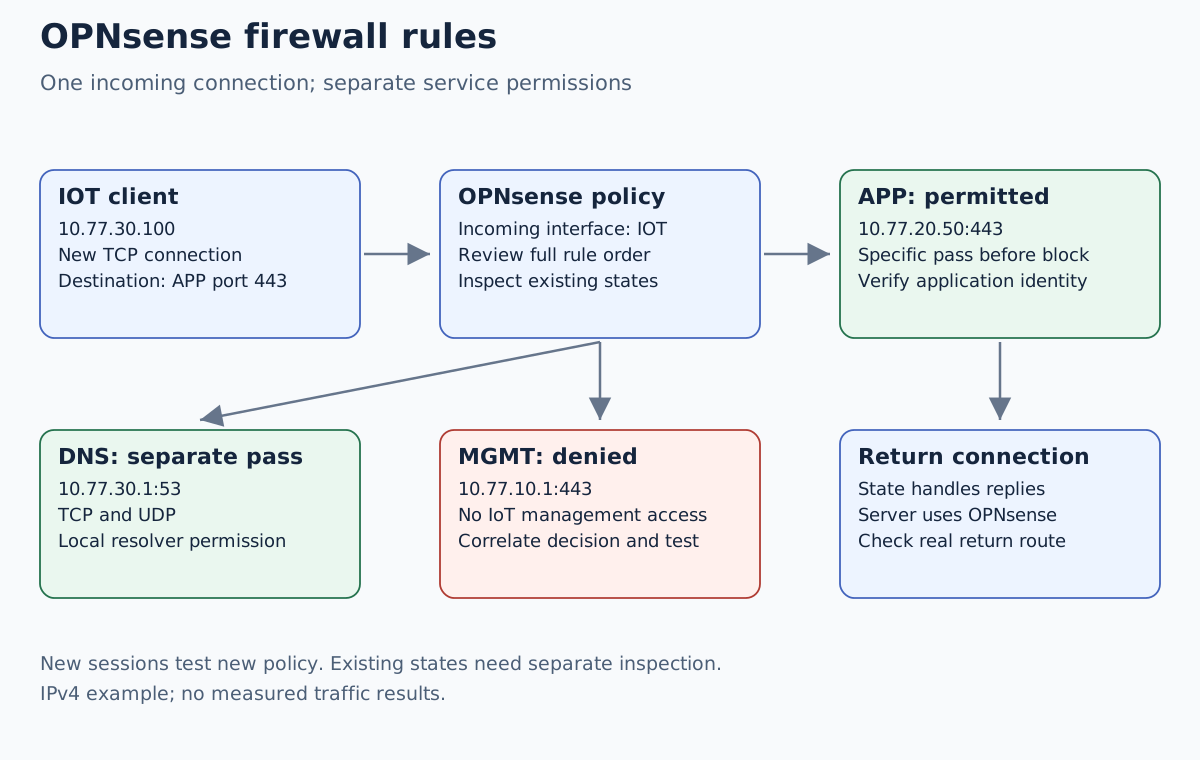
For 10.77.30.100 → 10.77.20.50:443, the first packet enters IOT. It is
not a new incoming connection on APP merely because the destination lives
there. Once a stateful pass creates a state, matching return traffic is
handled by that state. A second broad APP-to-IOT allow is not required just
to permit this connection’s replies.
For 10.77.30.100 → 10.77.30.1:53, the firewall itself is the destination.
That is a different service boundary from forwarding to an application.
Using the interface address makes our DNS permission specific; an unrestricted
permission to all firewall services would grant more than intended.
Two clients in the same VLAN can communicate directly at Layer 2. Their traffic may never reach OPNsense. A routed rule therefore cannot prove same-VLAN client isolation; that requires controls on the relevant switch, AP or endpoint.
Check the complete order and the connection state
With quick rules, an earlier matching decision wins. Rules without quick have different last-match behavior. Automatic rules and floating/group policies can decide a connection before the interface rows shown above. Use the documented rule inspection facilities to review the actual order. Where modern and legacy rules coexist, inspect both; do not assume a smaller sequence number in a different priority group moves a rule ahead of everything.
A connection opened before a policy change may keep using an existing state. For acceptance, open a new test connection and check its tuple in Firewall → Diagnostics → States. If you must invalidate an old test state, identify and remove only that state during the lab change. A global state reset also interrupts unrelated users and management sessions.
NAT adds another stage to the reasoning. With destination translation, the filter commonly needs the translated destination, and the selected NAT rule association can affect how traffic is passed. Our internal example uses no NAT between lab networks. Do not add outbound NAT to conceal a missing return route without first understanding that route.
Prove both permission and refusal
Use a known listening application and a valid certificate trusted by the test client. From the IoT test endpoint, the following starts a new HTTPS request to the chosen lab IP while preserving the intended TLS hostname:
curl --connect-timeout 5 --max-time 15 --resolve app.home.arpa:443:10.77.20.50 https://app.home.arpa/
This command is a candidate client-side test, not captured output. It assumes
the service certificate covers app.home.arpa; configure the lab’s trust
properly rather than disabling TLS verification.
| New test connection | Intended result | Evidence to collect |
|---|---|---|
Admin → 10.77.10.1:443 | Allow | Fresh GUI login |
IoT → 10.77.20.50:443 | Allow | Application marker and matching state |
| Guest → same application | Deny | Relevant block log plus known positive control |
| IoT/Guest → management HTTPS | Deny | Matching block decision for a known reachable listener |
| IoT/Guest → own interface DNS | Allow | Correct DNS response over UDP and TCP |
Unanswered ping alone proves little: the endpoint may not answer ICMP. Check the relevant service, source address, ingress interface, rule identity and timestamp together. Keep diagnostic logging narrow and remove unnecessary high-volume logging after the exercise.
Diagnose a mismatch and restore access
If a supposedly denied connection works, first confirm it crosses OPNsense. Then inspect old states, earlier passes, interface groups, NAT-associated permissions and a possible alternate IPv6 path. If an allowed flow fails, work from client route to ingress capture, rule decision, destination listener and return route. A correct pass cannot start a stopped application.
This worked policy covers IPv4. It does not establish dual-stack isolation. Before using it for a dual-stack network, inventory assigned IPv6 prefixes, router advertisements and equivalent policy, preserving necessary ICMPv6. Repeat the service tests over IPv6 or explicitly document the lab as IPv4-only.
If the new management session fails, stop the experiment and use the console to revert the recorded change or restore the known-good configuration using the supported recovery workflow. Do not disable the packet filter as a shortcut. Repeat fresh management and application checks after rollback.