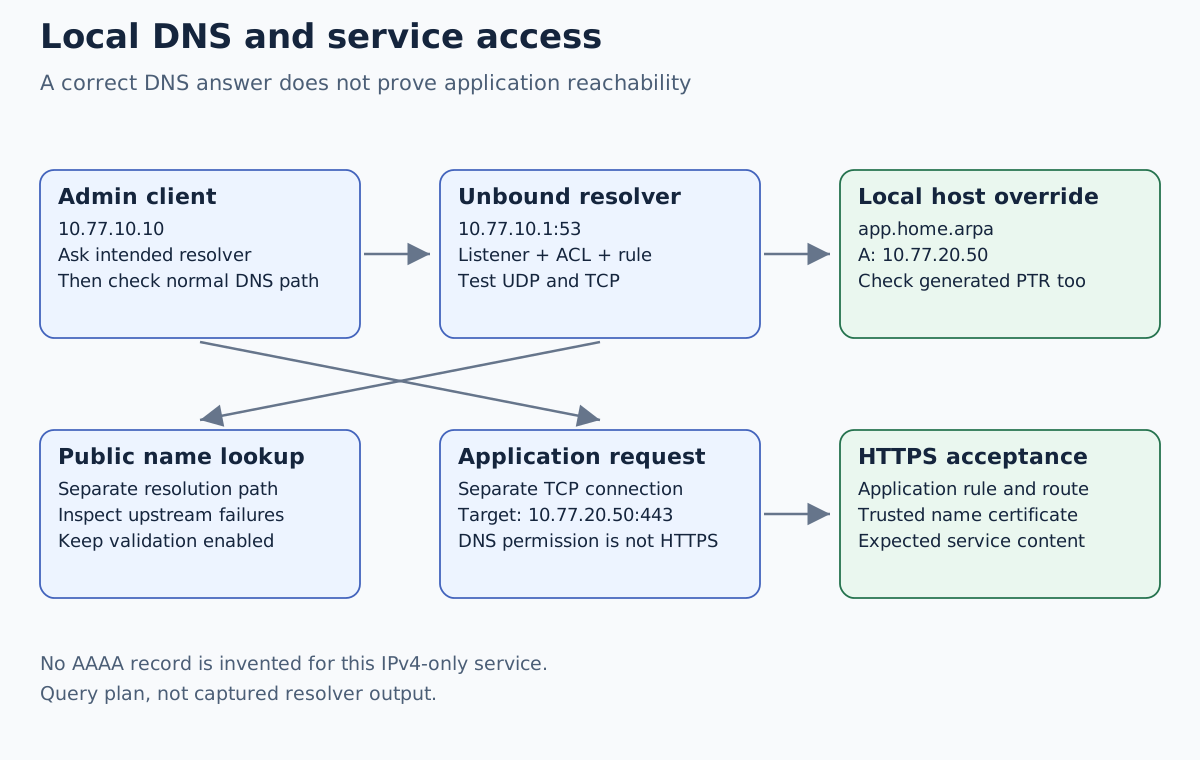
To give a local service a name through OPNsense Unbound, create a host override, make the resolver reachable from the intended clients, and ensure those clients actually use it. Test an explicit query to the firewall first, then test the client’s normal resolution path. A successful firewall-side lookup does not establish that a laptop or browser uses the same resolver.
Validation: This example was checked against documentation on November 11, 2026. No resolver changes or DNS tests were performed. Record the installed OPNsense build and current DNS/DHCP arrangement before applying it in a disposable lab. The example covers a static local service; automatic DHCP-name registration is a separate backend-specific task.
Assign one owner to the service name
The application has a static private address 10.77.20.50/24, gateway
10.77.20.1, and a known HTTPS listener. The admin client is
10.77.10.10/24, with resolver 10.77.10.1. Other VLAN clients use their
own firewall interface address if their policy permits DNS.
We use app.home.arpa for the lab. home.arpa is designated for local
residential naming by RFC 8375; it is not a public domain to register or a
promise of globally unique hostnames. Use a domain you control for a different
naming design, and avoid leaking private queries upstream.
| Responsibility | Owner in this example |
|---|---|
| Service’s static IP | Application host configuration |
app.home.arpa record | Unbound host override |
| Client’s resolver address | Client settings / selected DHCP options |
| Permission to query DNS | Incoming firewall rule and Unbound access controls |
| Permission to use HTTPS | Separate routed application rule |
Export a protected firewall configuration and record the current DNS settings first. Keep management reachable without resolving the new application name. Do not edit the firewall’s own hostname, upstream DNS and DHCP backend during the same small host-override exercise.
Check the listener, access list and firewall separately
Under Services → Unbound DNS → General, confirm Unbound is enabled and uses the intended DNS port, here 53. Review Network Interfaces: the resolver must respond on the addresses the clients query. Another DNS service must not compete for the same socket.
Review Access Lists for the actual client networks. Assigned networks can have automatically generated entries, so inspect before adding duplicates. The most specific applicable network policy matters. Do not allow every internet source just to fix one local client’s refusal.
For the admin lab client, review a narrow incoming MGMT permission from
10.77.10.10 to 10.77.10.1, TCP/UDP destination port 53. Add permissions
for other client networks only when intended by their policy. DNS over TCP
is required for a complete DNS service; UDP success alone is insufficient.
No WAN DNS permission is part of this example.
The firewall’s system DNS settings, Unbound’s listening addresses and the resolver advertised to clients are three different controls. Record each one. Replacing system DNS does not automatically correct a client’s stale DHCP lease or an application using a different resolver.
Create a host override without duplicating a forwarded zone
Under Services → Unbound DNS → Overrides, create this host entry:
| Field | Candidate value |
|---|---|
| Host | app |
| Domain | home.arpa |
| Type | A / IPv4 |
| IP address | 10.77.20.50 |
| Description | Static lab HTTPS application |
Save and apply using the installed UI. The Host field contains the label,
not app.home.arpa. repeated together with the Domain field. Start with one
exact record and no wildcard or alias.
Before creating the entry, check whether another server already owns this zone through Query Forwarding. If a DHCP naming zone is owned by Dnsmasq, use distinct subdomains or document how a more specific local override fits that design. Two disconnected copies of the same name make later diagnosis unnecessarily difficult.
This example has no IPv6 service address. Do not invent an AAAA record by converting the IPv4 address or copying a temporary IPv6 address. If you later add AAAA, first establish stable addressing, routing, a listening service and an equivalent IPv6 permission.
Query the intended server explicitly
On a lab client with dig installed, run these candidate checks:
dig @10.77.10.1 app.home.arpa A
dig +tcp @10.77.10.1 app.home.arpa A
dig @10.77.10.1 app.home.arpa AAAA
dig @10.77.10.1 -x 10.77.20.50
Inspect status and answer sections, not just a command’s exit code. The
intended A answer is 10.77.20.50. With no IPv6 record in this design, an
AAAA query should not return an invented service address; inspect the actual
rcode and section contents instead of treating every empty response as an error.
The Unbound documentation describes PTR generation for ordinary non-wildcard host overrides. Check that reverse lookup identifies the intended local name; do not infer PTR behavior for aliases or wildcards from this one entry.
Next query an ordinary public name chosen for your test and inspect the response. Public-resolution failure alongside a working local override points toward upstream resolution, forwarding, DNSSEC or connectivity. It does not mean the static host entry must be recreated.
Compare explicit queries with the client’s normal behavior
dig app.home.arpa A
curl --connect-timeout 5 --max-time 15 https://app.home.arpa/
Check the DNS server reported by the first command. Platform resolver behavior differs: a DNS utility, the operating system and a browser using encrypted DNS may take different paths. Inspect the active adapter’s resolver settings and renew a disposable client’s lease through its supported UI if its advertised DNS changed. Do not claim a single shell command refreshes all client applications.
The HTTPS command requires a certificate valid for app.home.arpa and trusted
by the client. It also requires a separate firewall permission to reach
10.77.20.50:443. A guest may be allowed to resolve a name yet denied the
service; that can be the correct policy.
| Observation | Next boundary to inspect |
|---|---|
| Explicit query times out | Route, port 53 rule, listener and packet arrival |
| Explicit query returns REFUSED | Unbound access policy for the actual source |
| Explicit lookup works; normal lookup fails | Client resolver selection, VPN DNS and application DNS |
| A is correct; HTTPS fails | TCP policy, listener, return route and TLS trust |
| Public names fail; local override works | Upstream resolution/forwarding and DNSSEC evidence |
| A works; application chooses unusable IPv6 | Actual AAAA answer and IPv6 path |
Use query logging only as narrowly and briefly as necessary: DNS logs reveal user activity. Correlate client address, timestamp and requested record type. A cache can also preserve an earlier answer or negative result; compare the direct resolver response before changing multiple services at once.
Keep DHCP registration and TLS upstream as separate follow-ups
A static override does not prove dynamic lease names work. Dnsmasq can own a local DHCP zone that Unbound forwards to, while Kea has different integration constraints and an authoritative-DNS update path. Check the selected backend rather than assuming an old lease-registration checkbox applies to all DHCP services. The Dnsmasq and Kea comparison works through a separate DHCP naming zone without duplicating the static application name used here.
If the goal is encryption between Unbound and an upstream resolver, use the existing DNS over TLS guide. That transport choice does not automatically make local naming or client DNS selection correct.
If the new record causes a problem, revert that override and the recorded listener/ACL/rule changes, then repeat a known working lookup. Use the saved configuration and console recovery if management itself is affected.