For a small OPNsense network that needs DHCP hostnames to resolve locally, Dnsmasq with Unbound is the straightforward documented starting point. Choose Kea when its lease-management, API or HA design meets a real requirement, and plan local DNS integration explicitly. A DHCP lease and a working local DNS name are different results.
Validation: Documentation reviewed November 11, 2026. Neither backend was deployed or compared on a lab during preparation. Features and UI vary by OPNsense build and edition. This guide chooses an architecture and defines one-client acceptance checks; it is not a live migration or HA failover recipe.
Choose the service by the names and leases you need
| Requirement | Dnsmasq path | Kea path |
|---|---|---|
| Small network with local dynamic hostnames | Documented Dnsmasq lease names with Unbound zone forwarding | Do not assume dynamic lease names appear in Unbound |
| DHCP reservations | Supported; use backend-specific pool placement | Supported; use backend-specific pool placement |
| DHCP lease synchronization / HA | A different design, such as deliberately split pools | Kea has a dedicated HA integration; needs its own validation |
| Dynamic updates to authoritative DNS | Not the workflow selected here | Review D2/RFC2136, zone ownership and update credentials |
| Router Advertisements | Dnsmasq can provide them | Kea does not itself supply RA; coordinate a separate service |
Do not turn a documentation sizing guideline into a hardware capacity benchmark. Choose from requirements, then measure the actual installation. An ordinary household with a few VLANs does not acquire an HA requirement just because an HA-capable backend exists.
The current DHCP overview lists ISC DHCP as end-of-life. For an existing ISC installation, plan an intentional move to a supported backend. For an existing working Dnsmasq installation, “newer DHCP software” alone is not a reason to replace it with Kea.
Understand the two local-name paths
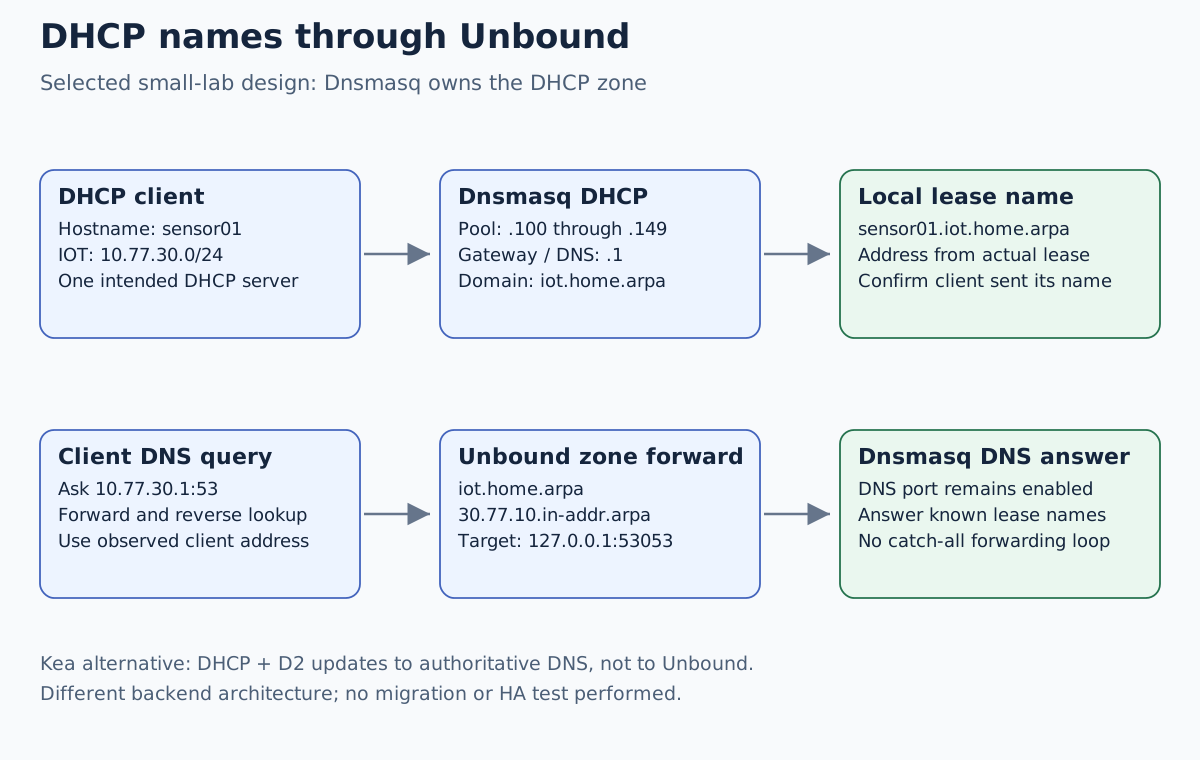
In our Dnsmasq design, clients query Unbound on port 53. Unbound answers
ordinary names itself and forwards a selected DHCP naming zone to Dnsmasq
on 127.0.0.1:53053. Dnsmasq supplies the names it learned with leases.
Its DNS function must therefore remain enabled; setting its DNS port to zero
would remove the service used by this design.
Kea’s DHCP service is not a replacement recursive resolver. The current OPNsense manual distinguishes static reservation synchronization with Unbound on service restart from dynamic lease hostname registration. It also describes Kea D2 updates to an authoritative DNS server. Sending RFC2136 updates to Unbound is not that architecture. Verify available CE/BE components and the authoritative server before promising dynamic names in a Kea deployment.
Work through one Dnsmasq segment first
Use the already isolated IOT network 10.77.30.0/24, with OPNsense at
10.77.30.1. Use iot.home.arpa for its DHCP names, keeping a static
application name such as app.home.arpa outside that more specific zone.
Our example client advertises hostname sensor01.
Export a protected firewall configuration, document existing leases/options and confirm management and console access. This is a spare lab segment; the selected recipe assumes Dnsmasq is not already serving other networks on this disposable appliance. Its General settings are shared by the service, not isolated to one new range. If Dnsmasq already serves management or another VLAN, do not replace its interface list or change its DNS port from this table: reconcile every existing consumer first, or rehearse on a separate instance. Review actual listener bindings before enabling anything: DHCP services may bind more broadly than their visible scope list suggests.
Under Services → Dnsmasq DNS & DHCP → General, review these candidates:
| Setting | Candidate value / reason |
|---|---|
| Enable | Enabled during the planned lab change |
| Interface | IOT; verify no unintended DHCP-serving interface |
| Listen Port | 53053, leaving Unbound on 53 |
| DHCP fqdn | Enabled for the selected naming design |
| DHCP register firewall rules | Review and enable the documented automatic DHCP rules |
| Do not forward to system defined DNS servers | Enabled for this local-zone-only role |
Keep unrelated DHCP/RA services off this test segment and inspect startup logs for socket conflicts. Port 53053 is a service-role choice, not a reason to open that port to WAN or all clients. Preserve required DNSSEC and upstream validation settings; no global DNS security disable is needed.
Under DHCP ranges, add the IOT range 10.77.30.100 through
10.77.30.149, domain iot.home.arpa. Verify effective options for gateway
10.77.30.1, DNS 10.77.30.1 and the intended domain. The documentation
describes automatic defaults, but the test client’s received options decide
whether this installation is correct.
Under Services → Unbound DNS → Query Forwarding, add two scoped entries:
| Domain | Server IP | Server port |
|---|---|---|
iot.home.arpa | 127.0.0.1 | 53053 |
30.77.10.in-addr.arpa | 127.0.0.1 | 53053 |
The second zone is the reverse of the first three octets of 10.77.30.0/24.
Do not copy another subnet’s reverse zone. Do not add a catch-all forward
back to Unbound that creates a loop. Review existing forwards and local zones
before applying these entries.
Unbound needs its normal IOT listener, an appropriate resolver access policy
and an incoming IOT permission for TCP/UDP 53 to 10.77.30.1. DHCP automatic
rules serve a different protocol and do not replace DNS permission.
The Unbound guide separates those listener, access-control and client-resolver checks.
Reserve addresses according to the selected backend
The current OPNsense DHCP overview recommends inside-pool reservations for Dnsmasq and outside-pool reservations for Kea/ISC. Do not move a reservation table between backends without reviewing that distinction and existing leases.
For illustration, a Dnsmasq reservation at 10.77.30.120 lies inside our
.100–.149 pool. A Kea design could instead reserve 10.77.30.60 while
keeping that address outside the dynamic pool. These are alternative designs,
not two servers to enable together. Inventory static hosts too: a manually
configured address is not protected from a DHCP collision merely by appearing
in a spreadsheet.
When testing a reservation, confirm the client’s actual identifier. Randomized MAC addresses, changed NICs or different client-ID behavior can make a copied reservation target the wrong identity.
Accept the result from a disposable client
Obtain or renew a lease through the client’s supported network UI, then record the serving DHCP server, leased address, mask, gateway, DNS and domain. Verify only the intended server offered the address. Our pool has 50 addresses; a lease outside it needs an explanation such as the reviewed reservation.
From that client, use candidate DNS checks such as:
dig @10.77.30.1 sensor01.iot.home.arpa A
dig +tcp @10.77.30.1 sensor01.iot.home.arpa A
dig @10.77.30.1 -x 10.77.30.100
The last command is valid only if the client’s observed lease is .100;
substitute its actual address. No output here is a recorded measurement.
Verify a public name separately, then check ordinary client resolution
without the explicit @server override. A client that does not advertise a
hostname cannot be assumed to acquire our chosen sensor01 name.
| Symptom | Boundary to inspect |
|---|---|
| No lease | VLAN/L2 path, DHCP listener, competing service, DHCP rules |
| Correct lease, wrong gateway or resolver | Effective options and client lease renewal |
| Correct address, missing dynamic name | Client hostname, domain, Dnsmasq record and scoped forwarding |
| A works, PTR fails | Actual address and reverse-zone entry |
| Explicit DNS works, application lookup fails | OS/application DNS selection and caches |
| Dnsmasq will not start | Bind conflicts and service logs; do not start a second server blindly |
Treat Kea migration and IPv6 as their own changes
If the requirements select Kea, write down whether local names are static reservations or D2 updates to an authoritative server. Include forward and reverse zones, client hostname behavior, protected update credentials, Unbound forwarding and recovery. For the actual cutover, extend the existing Kea migration guide rather than running two uncontrolled servers against the same clients.
DHCPv6 does not advertise an IPv6 default gateway the way DHCPv4 does. Router Advertisements have a separate role. Choose and verify one intended RA design; do not enable a second RA service incidentally while comparing DHCP backends. This IPv4 exercise does not establish IPv6 behavior.
For rollback, stop the new service on the isolated segment before restoring its previous service/options and scoped DNS configuration. Check remaining leases and client settings rather than assuming a service restart rewrites every client’s lease. Recheck management, one client lease and local/public DNS.