
When a VPN connects and a small request succeeds, but a larger transfer stops, a path MTU problem is one possibility. Look for packets that exceed a path’s usable size and for missing feedback to their sender. Do that before choosing a smaller MTU or applying a TCP MSS workaround.
The symptom alone is not a diagnosis. Congestion, application timeouts, receiver limits and storage problems can also interrupt a transfer. This guide provides an evidence checklist and a calculated example, not a capture from a tested network or a universal tunnel setting.
Start with the packet that stops making progress
Suppose the handshake completes and a short response arrives, but the next response stalls. Those events can involve very different IP packet sizes. Seeing small packets cross the path tells you little about whether larger ones will fit. RFC 2923 describes this PMTUD black-hole pattern, including successful small control packets alongside failed large data packets.
A successful ordinary ping establishes that its echo exchange worked. It does not establish the maximum packet size for the application path. Record the actual destination, IP family, transport and direction: a ping to the tunnel gateway is not the same flow as an HTTPS download from a server behind it.
If even the small application request fails, first check addressing, routes, permissions and return traffic. The MikroTik WireGuard guide separates those checks from tunnel authentication.
Keep link MTU, path MTU and TCP MSS distinct
| Term | What it describes | What it does not establish |
|---|---|---|
| IP link MTU | Largest IP packet carried in one piece over a link | The usable size of every later link |
| Path MTU | Smallest link MTU along a particular packet path | An identical value for the reverse path |
| TCP MSS | A limit on TCP data advertised by a receiving endpoint | A size limit negotiated by UDP |
Here, MTU counts the complete IP packet, including its IP header. Ethernet framing is outside that count. For a tunnel, distinguish the inner IP packet from the outer encapsulated packet. Outer headers consume space on the underlay, so an underlay MTU cannot simply be assigned as an inner MTU.
Write down the actual encapsulation and supported behavior before calculating an inner limit. Nested tunnels, outer IPv4 versus IPv6 and additional headers can change the calculation. The example below starts with an assumed inner limit; it does not derive an overhead allowance for WireGuard or another VPN.
Follow the feedback in IPv4 and IPv6
In classic IPv4 PMTUD, a source sends packets with Don’t Fragment (DF) set. A router unable to forward a packet because the next link is too small discards it and returns ICMP Destination Unreachable, Type 3, Code 4: fragmentation needed and DF set. The sender can then reduce its packet size. That mechanism is specified in RFC 1191. Without DF, IPv4 fragmentation may occur; that is a different case from an oversized packet discarded under DF.
IPv6 has no DF flag. Routers do not fragment packets along their delivery path; fragmentation, when used, is performed by the source, as specified in RFC 8200. IPv6 PMTUD uses ICMPv6 Packet Too Big, Type 2, to inform the sender of a constraining MTU. RFC 8201 explains the feedback and the black holes that can result when it is unavailable.
Do not equate permitting echo requests with delivering these error messages. The error must reach the relevant sender and be associated with its traffic. With encapsulation, an underlay error can first reach the tunnel endpoint, which must handle the information appropriately for the inner traffic.
Work through an illustrative 1420-byte inner MTU
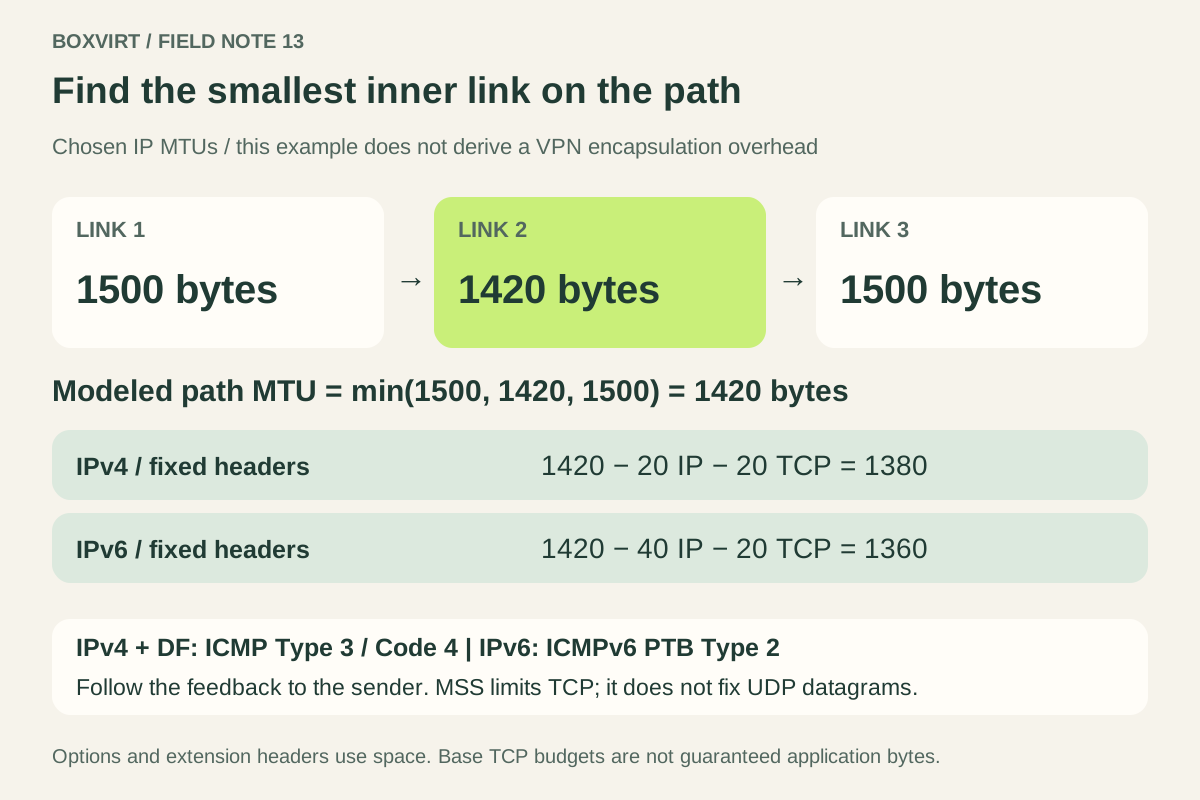
Assume an inner IP path contains links of 1500, 1420 and 1500 bytes. Its modeled path MTU is therefore 1420 bytes. These are chosen inputs, not measurements or a recommendation to set every VPN to 1420.
A 1500-byte inner IP packet cannot cross the 1420-byte link in one piece. For IPv4 with DF set, the expected feedback is fragmentation needed; for IPv6 it is Packet Too Big. If that feedback is lost and the sender keeps retransmitting oversized packets, the transfer may stop making progress.
For TCP, subtract the fixed IP and TCP headers from this assumed budget:
| Inner packet format | Calculation | Base-header TCP data budget |
|---|---|---|
| IPv4, 20-byte IP header and 20-byte TCP header | 1420 − 20 − 20 | 1380 bytes |
| IPv6, 40-byte IP header and 20-byte TCP header | 1420 − 40 − 20 | 1360 bytes |
These figures are not guaranteed application bytes in every packet. RFC 6691, now superseded by RFC 9293, section 3.7.1, distinguishes the MSS option calculation from the sender’s actual data length: the advertised value uses fixed headers, while the sender must also account for options it includes. IPv6 extension headers also consume packet space. TLS and application framing can reduce the useful application content further.
Collect evidence that can distinguish the causes
Use a controlled transfer to a destination you are authorized to test. Keep the IP family, route and application consistent while comparing behavior. This is a checklist for your investigation; no captures are claimed for this article.
| Observation to record | What to investigate next |
|---|---|
| Same large TCP data repeatedly retransmitted without progress | Where those packets disappear, and whether size rather than general loss predicts failure |
| ICMP fragmentation-needed or ICMPv6 PTB exists near the bottleneck | Whether it reaches the sender and identifies the affected traffic |
| Feedback reaches the sender but packet size does not adjust | Endpoint handling, reported MTU and tunnel processing |
| Upload works while download fails | The opposite sender and its path; do not assume symmetry |
| IPv4 works while IPv6 fails | Separate IPv6 path and ICMPv6 handling |
| Small and large packets both suffer irregular loss | Congestion, link faults and other causes alongside the MTU hypothesis |
| Network delivery progresses but application output stops | Receiver, proxy, storage and application evidence |
Compare observations at the sender and around the suspected constraint when authorized capture points are available. Check whether a displayed size refers to the inner or outer packet and whether it includes link-layer headers.
Host captures can show packets larger than the link MTU because of segmentation or aggregation offload. The Wireshark offloading notes explain this capture limitation. One oversized-looking host record does not prove that an oversized frame went onto the wire.
If the path crosses guests, bridges and VLANs, map that full chain using the Proxmox networking guide. Keep the return path and the path taken by error feedback on the drawing too.
Choose a change that addresses the observed boundary
When evidence identifies a wrong link or tunnel MTU, correct that specific boundary using the documentation for the installed platform. When required PMTUD feedback is being lost, investigate its delivery and processing. Avoid changing every interface at once: you would lose the ability to identify which change mattered.
TCP MSS clamping can limit the data the peer will send by reducing an MSS option in the connection handshake. RFC 9293 defines MSS as a receive limit communicated in SYN segments. The direction matters: the client’s advertised limit affects data sent to the client; the server’s affects data sent to the server. Inspect the relevant SYN and SYN-ACK and verify behavior with a new connection after a scoped change.
MSS clamping does not fix UDP datagrams, nor does it repair the underlying feedback path. UDP applications need appropriate packet sizing and discovery behavior. RFC 8899 describes Datagram Packetization Layer PMTUD, which uses confirmed probes to discover usable sizes without depending on receipt of ICMP errors. Availability depends on the actual transport implementation; do not assume every application uses it.
Before any change, save the relevant configuration, retain independent recovery access and define how to restore the previous setting. Validate a new connection in both required directions, for each IP family and transport you depend on. Record packet-size evidence as well as whether the transfer completes. Once the path works reliably, the backup transfer-time worksheet can help plan duration from sustained payload speed.
When a handshake works but even a small application request fails, the AllowedIPs worksheet helps check interface routing and peer address ownership first.