Deleting a backup in Proxmox Backup Server removes its snapshot metadata. The underlying data chunks may still be needed by another backup. Garbage collection (GC) separately finds unreferenced chunks and removes them when its safety cutoff permits. A successful prune job therefore need not produce an immediate increase in free space.
Diagnose the result in this order: did retention remove the intended snapshot, is its data still referenced, has GC completed, and are removals pending? Deleting more recovery points before answering those questions can lose useful history without solving the space problem.
This guide assumes an existing local filesystem-backed PBS datastore, a backup group and permission to inspect them. S3-backed and removable datastores need their own backend-specific checks. For installation, credentials, encryption and a first restore, start with PBS setup.
Validation: official PBS documentation labeled 4.2.9-1 was reviewed on November 9, 2026. No backup deletion or GC run was performed. Calendar entries, chunk labels and sizes below are models, not results from a datastore.
Retention, prune and GC answer different questions
| Operation or view | What it tells you |
|---|---|
| Retention policy | Which recovery points should remain? |
| Prune preview | Which existing snapshots would the policy retain or remove? |
| Prune execution | Which snapshot metadata was actually removed? |
| GC task | Which data chunks are unreferenced and eligible for removal? |
| Datastore filesystem usage | How much space is currently occupied or available on that filesystem? |
| Restore test | Can a retained recovery point recover the application? |
PBS stores backup data as chunks referenced through snapshot indexes. Reuse of a chunk by several snapshots is part of deduplication; snapshots are not independent full-size files whose lengths can simply be subtracted from filesystem usage. The technical overview describes the chunk and index model.
1. Decide which history you need before previewing deletion
Record the datastore, namespace, backup group, desired recovery history and
who controls pruning. Retention applies to each backup group’s history;
keep-daily: 3 is not a three-snapshot budget for an entire server.
Choose one clear policy owner for the example, a PBS-side prune job. Inspect any PVE backup-job or storage-side pruning settings as well. An additional deletion path can remove a recovery point before the PBS policy would have done so. Retention cannot recreate snapshots already deleted elsewhere.
Also check protected snapshots, incomplete backups and timestamps before interpreting the count. They can differ from the simple complete, unprotected, past-dated snapshots used below. Inspect clock configuration if future-dated snapshots appear; the maintenance manual says they are retained rather than processed as ordinary older snapshots.
A five-snapshot calendar with a missing day
Assume one group vm/201 has exactly these five complete, unprotected
snapshots. They are all in the same namespace; the evaluation happens after
the latest snapshot. Times are UTC, as indicated by Z, and all belong to
the displayed calendar dates in this example.
Set only keep-daily: 3. Other retention options are unset:
| Snapshot timestamp | Result in this model | Reason |
|---|---|---|
2026-11-09T08:00:00Z | Keep | Latest backup in the newest represented day |
2026-11-09T02:00:00Z | Remove | Older backup from the same day |
2026-11-08T02:00:00Z | Keep | Latest backup in the second represented day |
2026-11-06T02:00:00Z | Keep | Third represented day; November 7 has no backup |
2026-11-02T02:00:00Z | Remove | Older than the three selected represented days |
This keeps three snapshots but spans four calendar dates from November 6 through November 9. It does not create a missing November 7 recovery point. It also removes the older same-day snapshot: daily retention is not the same as keeping every snapshot made during three days.
When combining keep-last, hourly, daily, weekly, monthly and yearly rules,
PBS processes them in the documented order and applies later rules to older
history beyond the periods already covered. Do not add the setting values
and advertise the sum as a guaranteed copy count. Use the actual history in
the prune simulator
and the real group’s preview; missing periods and extra manual backups matter.
2. Preview the exact group and namespace
In PBS, select the intended datastore and namespace. In Content, inspect the group and use its prune action to review the keep/remove decisions before confirming anything. Compare the timestamps with your required recovery points. Do not change protection flags just to make the preview match a target count.
For a CLI preview, the
backup-client reference
documents prune, --dry-run, repository and namespace options. From an
administrative client with appropriate existing access:
proxmox-backup-client prune vm/201 --repository 'operator@[email protected]:lab-backups' --ns lab --keep-daily 3 --dry-run true
pbs.example.net, lab-backups, lab, operator@pbs and vm/201 are
illustrative identifiers. Replace them together with the verified target.
This example is for a group in the lab namespace; for the root namespace,
omit --ns lab deliberately. Keep the normal TLS verification and use an
already trusted server identity. Do not place a password or API-token secret
in the command line or disable certificate checks.
Review the complete output and command status. A permissions failure, empty selection or wrong namespace does not establish that retention is correct. Use an account authorized for this pruning scope; a token suitable for creating backups is not automatically authorized to delete any group’s snapshots. Keep the preview and target identifiers in your maintenance record.
This command is intentionally a dry run. Execute pruning only after matching the real preview to the recovery policy, using the reviewed scope in the GUI or an explicitly reviewed PBS prune job. Start with a small disposable group before enabling broader scheduled deletion. No schedule is installed by this article.
3. Check what pruning actually removed
After the approved prune runs, inspect its task log and refresh the same group in Content. Check that the intended snapshots disappeared and that the required newest and older recovery points remain.
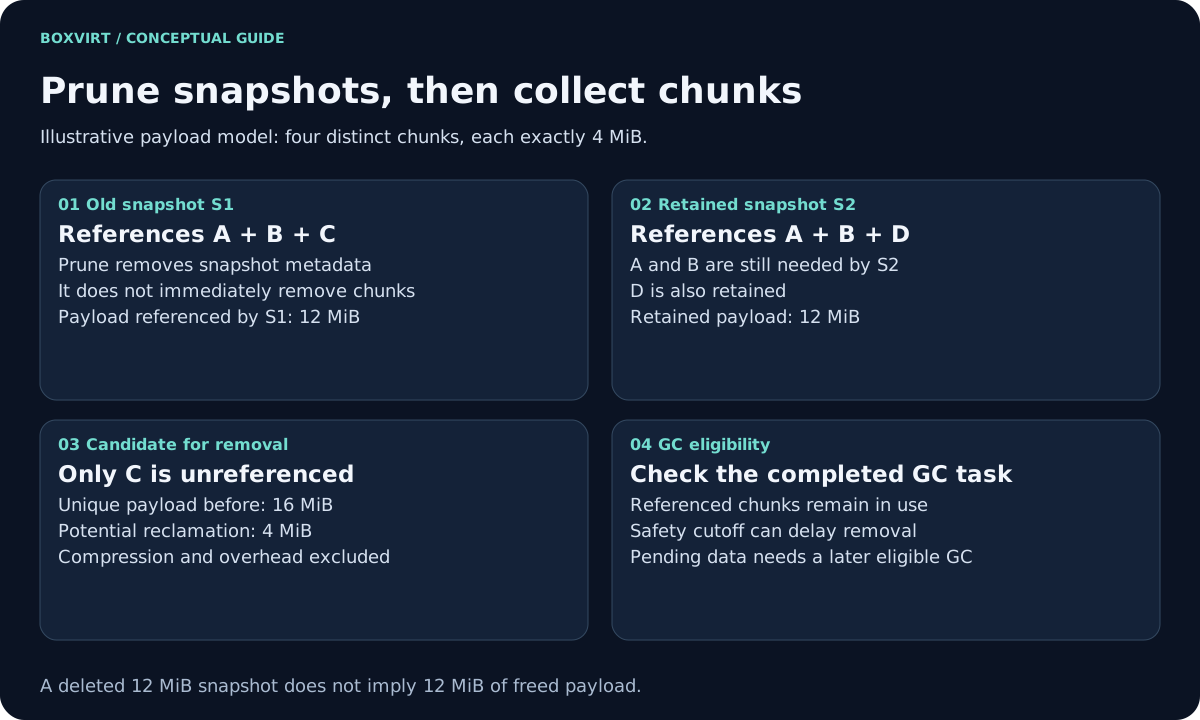
Snapshot count and filesystem space are separate observations. In a symbolic example, let every chunk have a physical payload of exactly 4 MiB, with compression and overhead deliberately excluded:
| Snapshot | Referenced chunks | Action |
|---|---|---|
| Old S1 | A, B, C | Prune |
| New S2 | A, B, D | Keep |
Before pruning, the union is A, B, C and D: 16 MiB of modeled payload. After removing S1’s metadata, S2 still needs A, B and D: 12 MiB. Only C’s 4 MiB becomes a potential GC removal. Removing a snapshot that references 12 MiB therefore does not necessarily free 12 MiB.
If all of S1’s chunks were also referenced by S2, potential payload reclamation would be zero. Real datastore metadata, compression, other groups and active backups make filesystem accounting more complex than this example. Use the retention capacity model for planning assumptions, rather than interpreting this illustration as a dedup ratio.
4. Run GC and read its completed task
In the datastore’s Prune & GC view, inspect the previous GC result and start a new run when appropriate for the datastore’s workload. GC works on the whole datastore, including references outside the one group or namespace you just pruned.
On the PBS server as an authorized administrator, the documented CLI
equivalents for the illustrative lab-backups datastore are:
proxmox-backup-manager garbage-collection status lab-backups
proxmox-backup-manager garbage-collection start lab-backups
proxmox-backup-manager garbage-collection status lab-backups
Starting a task is not evidence of completion. Follow its task log through the final status, preserve errors, and read the completed run’s removed-data and pending-removal figures. The manager reference defines these commands.
GC marks data still referenced by snapshot indexes, then sweeps chunks subject to an access-time cutoff. Under the documented default behavior, that cutoff accounts for a 24-hour-and-5-minute safety interval and the oldest active backup writer when relevant. This is not a promise to release space exactly 24 hours and 5 minutes after clicking Delete.
Chunks recorded as Pending removals were not eligible for deletion in that run. Once the relevant cutoff allows removal, a subsequent successful GC is still needed. Record the run’s start time, any active writer and its pending total before deciding whether the result is unexpected. The maintenance documentation explains the access-time behavior.
PBS exposes datastore tuning options affecting GC timing and checks. Leave them at their documented defaults for this procedure; reducing the cutoff, disabling the access-time safety check or manipulating chunk timestamps is not a demonstrated fix for a full datastore. The storage documentation explains why correct access-time behavior matters.
5. Compare the datastore with the filesystem underneath
For this local-filesystem example, an authorized PBS administrator can inspect the configured path and then the filesystem containing it:
proxmox-backup-manager datastore show lab-backups
Read the returned path, then substitute it below. /mnt/datastore/lab-backups
is an example path, not a location discovered on your server:
findmnt -T /mnt/datastore/lab-backups
df -hT /mnt/datastore/lab-backups
df -i /mnt/datastore/lab-backups
Verify that the expected device is mounted. Compare filesystem capacity and inode usage before and after a completed GC, using the same filesystem and units. Other data on that filesystem, underlying filesystem snapshots, quotas and reserved space can affect what is available. If there are separate ZFS snapshots retaining datastore blocks, inspect their own retention rather than assuming PBS GC deletes them.
For a datastore approaching exhaustion, preserve the task evidence and required
recovery points, control further growth through your maintenance process, and
arrange capacity or qualified recovery work. A full filesystem may lack room
for normal maintenance. Do not delete files from .chunks or discard snapshot
indexes by hand: that can damage retained recovery points.
Diagnose the observation before changing retention
| Observation | Next check |
|---|---|
| Snapshot count did not fall | Correct group/namespace, completed prune, protection and actual keep/remove decisions |
| Count fell; GC has not run | Schedule or run GC, then read its completed task |
| GC reports pending removals | Cutoff eligibility, active writer and a later successful run |
| GC succeeded with few eligible chunks | References from other retained snapshots and groups |
| GC removed chunks; filesystem still appears full | Correct mount, other data, quotas, inodes and underlying filesystem snapshots |
| Prune or GC failed | Task error and capacity/permissions; do not interpret a failed job as successful cleanup |
Before automating, keep one maintenance record containing the policy owner, scope, preview, actual removed snapshots, completed GC result, remaining free space and an isolated restore of a retained point. Set schedules and alerts from observed job durations and growth, while allowing for delayed reclamation. A retention rule defines desired history; it does not automatically make space whenever a new backup needs it.
An accidentally pruned snapshot has no supported “undo prune” button in this workflow. Leftover chunks are not a replacement for the lost snapshot’s manifest and indexes. Recover from another retained point or an independent copy, and verify its application data before cutover.