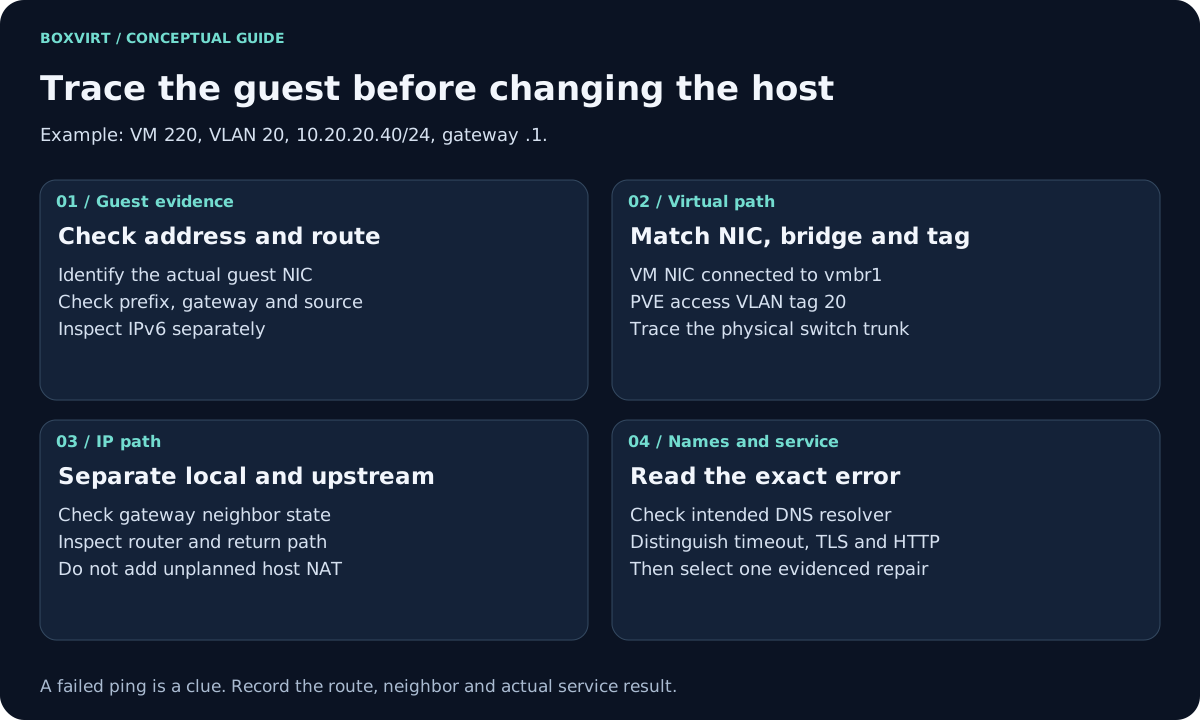
When a Proxmox VM has no internet, start inside the guest: does its NIC have the intended address, and does a route lead to the correct gateway? Then trace the configured virtual NIC, bridge, VLAN and physical uplink. Test DNS after checking the IP path. Change only the setting supported by the evidence you collected.
This guide uses a Linux VM connected to an external router through a Linux bridge. Proxmox does not need to NAT this example. A routed/NAT lab, SDN network, Windows guest or virtual-router VM needs its own additional branch. The host being able to update packages does not establish that the guest’s different VLAN and address path works.
Validation: documentation reviewed November 10, 2026. The faults below are diagnostic hypotheses, not reproduced failures. No guest networking, bridge, firewall or router was changed or tested while writing this guide.
Write the intended path before following symptoms
Use this consistent example, replacing it with your actual inventory:
| Layer | Intended example |
|---|---|
| Guest | VM 220, Linux NIC ens18, 10.20.20.40/24 |
| Guest route | Gateway 10.20.20.1 on ens18 |
| PVE NIC | Connected to vmbr1, VLAN tag 20, link connected |
| Bridge/uplink | VLAN-aware vmbr1 through physical eno2 |
| Switch/router | Trunk carries tagged VLAN 20 to its router interface |
| Resolver | An explicitly configured, reachable DNS service |
The address plan is illustrative. A VLAN ID and an IPv4 subnet number are not inherently related; they match here only to make the worksheet easier to read. For the complete tag matrix, use the VLAN walkthrough.
1. Check the guest address and route
From the guest console, not the PVE host shell:
ip -br link
ip -br address
ip route
ip -6 route
Identify the actual interface; ens18 is not guaranteed. A missing interface
suggests a guest driver or virtual hardware problem. A down interface or missing
address calls for guest network-manager, DHCP or static configuration checks.
An address in another subnet calls for comparison with the intended VLAN and
DHCP scope.
For the sample static configuration, expect 10.20.20.40/24 and a default route
through 10.20.20.1 on the same interface. A link-local-only address does not
demonstrate that ordinary IPv4 provisioning succeeded.
Inspect the route selected for a documentation destination without sending a packet to it:
ip route get 192.0.2.1
192.0.2.1 is used only for this lookup. The output should select the intended
gateway, interface and source for the simple example; it does not prove that
the gateway forwards packets. VPNs and policy routing may require ip rule
and the relevant routing tables as well. See the
route inspection manual.
2. Compare PVE configuration with the live path
On the lab PVE host, inspect the intended guest and uplink:
qm config 220
ip -br link
bridge link show
bridge vlan show
Check the VM’s actual NIC model, bridge, MAC, VLAN tag, firewall option and disconnected-link setting. Match the guest interface’s MAC to the configured NIC when there are several. A stopped VM or an unplugged virtual NIC needs attention before router troubleshooting.
Follow runtime membership rather than guessing a single tap interface name. Firewall implementations can introduce additional interfaces. Compare the bridge, physical link and permitted VLAN with the switch port and router uplink. The PVE networking manual documents bridged, routed and NAT designs; do not mix their requirements.
For an access-style VM tagged 20 in PVE, the guest normally uses an untagged interface. An extra guest VLAN subinterface belongs to a deliberate trunk design, not a general repair. The bridge command reference helps interpret the live VLAN membership.
3. Separate local neighbor resolution from forwarding
In the guest, probe the known example gateway and inspect its neighbor entry:
ping -c 3 10.20.20.1
ip neigh show to 10.20.20.1
Replace the address with the actual gateway. A failed ping alone is ambiguous: the router may filter ICMP. A persistently incomplete or failed neighbor entry after traffic is a reason to investigate the local address, prefix, VLAN, bridge and gateway presence. A stale entry is not automatically a fault; use the neighbor-state documentation to interpret it.
Once the local gateway path is understood, test a known permitted external service. If you need to separate DNS from connectivity, use an externally reachable HTTPS endpoint and its independently known current address, preserving its hostname for TLS. Do not disable certificate verification or use an arbitrary IP that might not serve the same site.
When the gateway is reachable but external traffic fails, review router forwarding, WAN/upstream connectivity, the return path and the relevant NAT policy. In this bridged design those are router responsibilities. Adding host NAT or enabling host IP forwarding without identifying a routed design can create a second, unintended network path.
4. Check name resolution and the actual application
Inside a guest with the relevant tools installed, these test name lookup and IPv4 HTTPS separately enough to capture useful errors:
getent ahostsv4 example.com
curl -4 --head --connect-timeout 5 https://example.com/
The public documentation domain is a sample target, not an availability promise.
Compare resolver configuration with the intended DNS service. If the guest has
systemd-resolved, its own diagnostic interface can help; do not assume that every
Linux guest uses it or that /etc/resolv.conf should be overwritten manually.
Capture whether the error is name resolution, connection timeout, refusal,
TLS verification or an HTTP response. A 403 response means an HTTP server
answered; it is different evidence from failing to establish a connection.
For dual-stack guests, test the intended IPv6 path separately. A working IPv4
test does not settle IPv6 addressing, DNS answers or routing.
Use the result to choose one repair
| Evidence | Next investigation | What it does not establish |
|---|---|---|
| Guest NIC missing | Virtual hardware and guest driver | That a bridge change will help |
| No intended address/default route | Guest configuration and DHCP path | That the host needs NAT |
| Gateway neighbor unresolved after traffic | Subnet, tag matrix, switch and router interface | That upstream internet is down |
| Known external IP path works; lookup fails | Resolver address, reachability and DNS service | That every application must use a public resolver |
| Lookup works; HTTPS fails | Destination service, policy, return path and TLS error | That all networking is broken |
| Small requests work; large transfers stall | MTU/PMTUD evidence | That DNS is the cause |
Use the MTU diagnostic guide for the last branch and the PVE firewall guide to inspect policy and logs. Do not flush the firewall as a discovery step.
Before a repair, save the affected guest/host/switch setting and retain console access. Change one evidenced cause, repeat the failed test and check management from another client. If the result worsens, restore that setting through the supported workflow and record the outcome. Keep the cause marked unresolved when the evidence does not identify it.