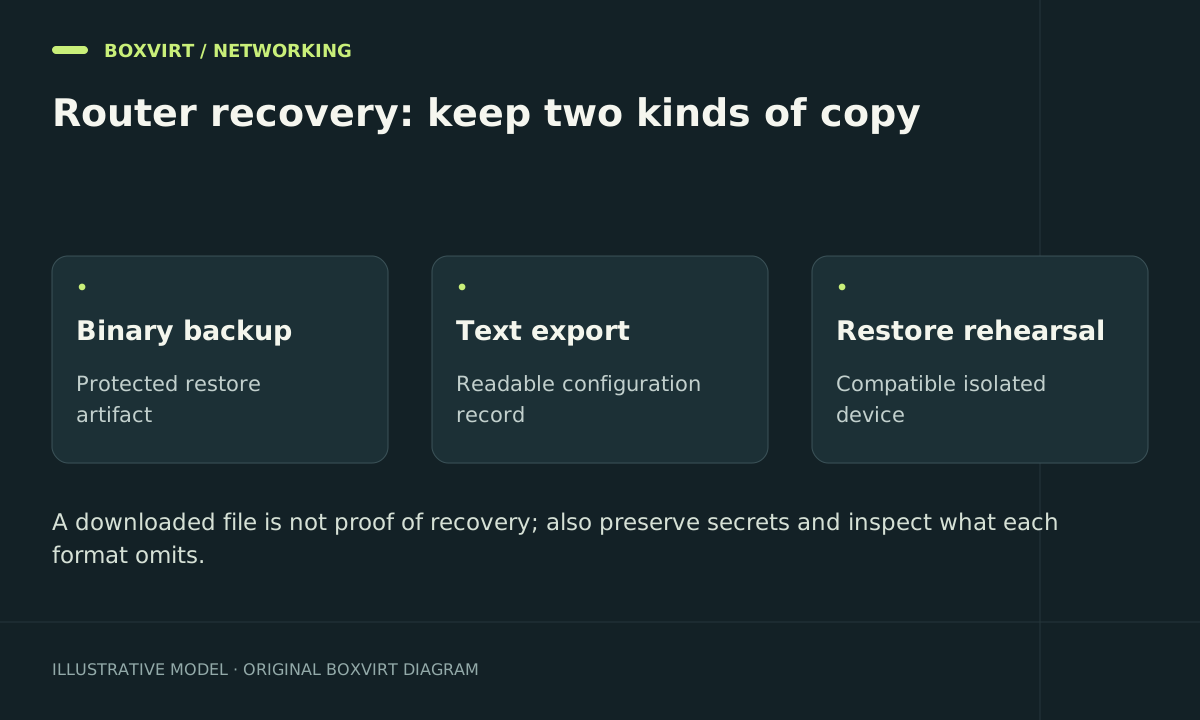
Keep binary backups for compatible device recovery, text exports for configuration review, and logs for explaining events. A .rsc export is not a complete backup, and a backup file on the router alone is unavailable when that device fails.
This RouterOS 7 workflow ties those artifacts to a change and a recovery test. It also provides a temporary, rate-limited firewall diagnostic that does not change an access decision.
Record a useful recovery bundle
| Artifact | Purpose | Keep with it |
|---|---|---|
Encrypted binary .backup | Restore configuration on a compatible device/software combination | Router model, RouterOS version, creation time and separately stored password |
Text .rsc export | Read, compare and selectively adapt configuration | Change description and release context |
| Separately preserved service material | Recover items outside export coverage | Certificates, keys and application-specific records as applicable |
| Test record | Demonstrate that recovery is usable | Management, DNS, DHCP, VPN and traffic checks |
Inspect the installed version and create readable exports:
/system resource print
/export file=before-firewall-change
/ip firewall export file=firewall-review
/file print
The firewall export covers that menu and its submenus; it is not the full router configuration. Default exports omit recognised sensitive values and some default settings, but they can still disclose addresses, comments and operational identifiers.
The official configuration-management documentation also identifies material that text export does not preserve, including system user passwords, installed certificates and SSH keys. Inventory the actual services on your device instead of assuming a successful export contains everything.
Create a password-protected binary backup
Use a unique backup name and a strong password from your secret store. Replace the placeholder locally; do not put a real backup password into a public article, issue or shared terminal transcript.
/system backup save name=before-firewall-change password="REPLACE_WITH_STRONG_UNIQUE_PASSWORD" encryption=aes-sha256
/file print where name~"before-firewall-change"
Download both backup and export over your trusted management path, confirm non-empty files, and retain them in access-controlled off-device storage. Store the password separately. Do not assume dont-encrypt=no alone encrypts a backup: the documented behaviour requires a supplied password on modern releases.
A binary restore can restore device-specific identity and settings and reboots the router. It belongs in a planned recovery procedure using compatible hardware/software, not an exploratory command on a live network.
Compare counters before enabling logs
For a failed service connection, record a precise source, destination, protocol and port. Inspect the expected rule’s counter:
/ip firewall filter print stats
If the counter does not move, investigate chain selection, rule order, routes and accelerated paths first. The chain guide helps identify whether the packet should be in input or forward.
An already established or FastTracked connection can hide the change you meant to test. Use a fresh connection rather than immediately deleting all tracking state.
Add one bounded diagnostic before the deciding rule
For an example workstation trying to reach the router’s SSH service, this disabled candidate logs new matching packets at a limited aggregate rate:
/ip firewall filter add chain=input action=log src-address=192.168.50.10/32 protocol=tcp dst-port=22 connection-state=new limit=3/1m,5:packet log-prefix="BV-SSH-CHECK " disabled=yes comment="Boxvirt temporary SSH diagnostic"
Replace the source and port. Place the candidate before the relevant accept or drop, then enable it briefly through the safe-change workflow. action=log continues processing; the existing later policy still makes the access decision. The limit applies to this rule, not separately to each client.
/log print where message~"BV-SSH-CHECK"
/ip firewall filter print stats where comment="Boxvirt temporary SSH diagnostic"
After collecting the test evidence, disable that exact diagnostic:
/ip firewall filter disable [find comment="Boxvirt temporary SSH diagnostic"]
Remove it after review if no longer needed. A logging rule placed after a terminating drop will not see the discarded packets. Conversely, logging every packet at a busy final drop can overload logs during a scan; keep sampling and policy enforcement separate.
Make logs useful off the router
Record accurate time, retention, destination and who can access the data. Remote logging can preserve evidence through a device restart, but transport and authentication depend on the release and selected format. Do not label ordinary UDP syslog encrypted.
Avoid permanent per-packet writes to small router flash merely because disk logging is available. Choose the logging destination and volume from the diagnostic need. Logs can contain internal and public addresses, so apply the same care you give configuration exports.
Rehearse recovery away from the production network
Use suitable lab equipment or an isolated recovery environment. Record the compatible restore procedure, then verify interface roles, management login, DHCP, DNS, VPN peer access and both permitted and denied traffic. A duplicate restored address or identity must not collide with the live router.
After each meaningful change, keep the previous known-good bundle and create a new labelled one. The firewall hardening guide explains how to evaluate new detection controls without turning logs or dynamic lists into uncontrolled workloads.
Frequently asked questions
Can I restore a router using only a firewall export?
Not the whole device. It omits other network configuration and service material. Use it for review or a deliberate partial migration, and keep the broader recovery bundle.
Is a binary backup guaranteed to work on any MikroTik model?
No. Treat compatibility, RouterOS release and device-specific configuration as explicit recovery requirements. A text export can help adapt selected settings but is not a universal image either.
Does a successful backup command prove recovery?
No. Verify the saved files, download them, retain the password and perform an isolated restore exercise. A functioning restored network is stronger evidence than the existence of a filename.
Why does my log rule not show a denied connection?
It may be after an earlier terminating rule, match the wrong chain or source, be disabled, or have exhausted its sampling allowance. Inspect counters and rule placement; a lack of log lines does not by itself prove there was no traffic.