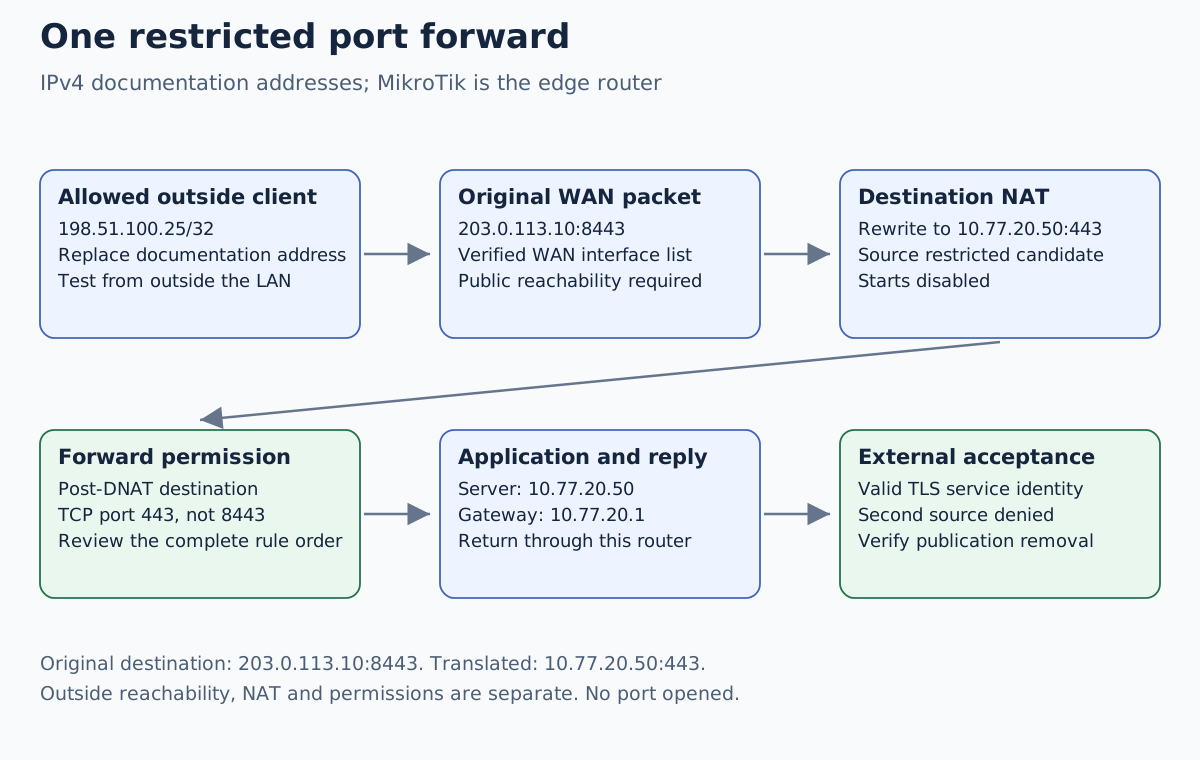
MikroTik port forwarding needs a reachable outside address, a destination NAT rule, an effective forward permission and a valid server reply path. Begin with public reachability: an added RouterOS rule cannot override an upstream carrier’s NAT or start a stopped HTTPS service.
Validation: documentation reviewed November 11, 2026. The commands below are disabled candidates for a selected IPv4 lab. No service was published or tested. Record RouterOS build, WAN interface, existing NAT/filter order, server gateway and external test source before applying them on a disposable router. Multi-WAN policy routing is outside this single-WAN example.
Establish who owns the outside address
In this example MikroTik is the router, not a VLAN switch behind an OPNsense gateway. Its WAN has the selected public-facing address, while the application is directly behind its APP interface. If OPNsense is your edge router, implement the edge publication there instead of copying a WAN rule onto a downstream switch.
Compare the WAN address with the internet-facing address observed through a
trusted method. A mismatch requires investigation, not an immediate verdict:
it may be ordinary double NAT, carrier NAT, multiple uplinks or an address
selection issue. 100.64.0.0/10 is shared space used for CGNAT; a private WAN
address also indicates an upstream private boundary, but does not by itself
tell you who controls that upstream router.
If you control an upstream NAT router, document its mapping to MikroTik and the source address that MikroTik actually receives. If the provider controls the inaccessible mapping, ask about a suitable reachable service or use a different access architecture such as an outbound tunnel to a controlled hub. Changing internal DNAT rules alone does not solve that limitation.
Define one application mapping and one permitted source
| Role | Chosen lab value |
|---|---|
| MikroTik WAN address | 203.0.113.10 |
| Outside test client | 198.51.100.25 |
| Public HTTPS endpoint | app.example.net:8443 |
| Internal application | 10.77.20.50:443 |
| Server gateway on MikroTik | 10.77.20.1 |
| WAN interface selector | Existing verified interface list WAN |
The two public-looking prefixes and example.net are documentation values;
replace them with your own controlled addresses and hostname. The private
server address is also an example. This mapping publishes an application,
not WinBox, SSH or the router’s management GUI.
First verify the application’s listener and valid TLS identity from an already permitted internal test path. The server must route replies to the external client through this MikroTik router. A host firewall must permit the intended source. Use the safe-change workflow and keep independent management and a protected off-device recovery copy.
Match the original tuple in NAT and the translated tuple in forward
Add only disabled, uniquely labelled candidates after checking for name, comment and rule collisions:
/ip firewall nat add chain=dstnat action=dst-nat in-interface-list=WAN src-address=198.51.100.25/32 dst-address=203.0.113.10 protocol=tcp dst-port=8443 to-addresses=10.77.20.50 to-ports=443 disabled=yes comment="Boxvirt M04 restricted HTTPS DNAT"
/ip firewall filter add chain=forward action=accept in-interface-list=WAN src-address=198.51.100.25/32 dst-address=10.77.20.50 protocol=tcp dst-port=443 connection-nat-state=dstnat disabled=yes comment="Boxvirt M04 restricted HTTPS forward"
| Stage | Destination seen in this example |
|---|---|
| Packet arrives at WAN | 203.0.113.10:8443 |
| After destination translation | 10.77.20.50:443 |
| Forward permission | Internal destination and TCP port 443 |
| Server reply | Returns through MikroTik and its tracked translation |
Putting the application permission in input would address the router itself, not the forwarded server. The existing firewall chains guide explains this distinction. Do not change the forward rule to destination port 8443 merely because that is the public port.
Review the full ordering and effective policy. Place candidates at the intended point in their own chains, preserving established/reply handling and deliberate security checks. Existing broader DNAT and accept rules may already publish the service; these two narrow candidates do not automatically cancel those permissions. Verify actual WAN-list membership before enabling anything.
On the selected lab router, enable the reviewed candidates individually and start a new connection from the allowed external source. No broad masquerade rule is added: connection tracking reverses the selected NAT for replies when the return path is correct. An unrelated server gateway needs a route design, not an unexplained blanket source-NAT workaround.
Test externally with the correct TLS name
From the controlled outside client, a candidate request is:
curl --connect-timeout 5 --max-time 15 --resolve app.example.net:8443:203.0.113.10 https://app.example.net:8443/
Replace the documentation endpoint first. The application needs a certificate
covering the hostname and a trusted chain on the test client. --resolve
selects the connection address while preserving the intended TLS name; it
does not disable certificate validation. Look for a known application marker,
not just any HTTP response.
On the lab router, inspect the specific candidates and the identified test connection:
/ip firewall nat print stats where comment="Boxvirt M04 restricted HTTPS DNAT"
/ip firewall filter print stats where comment="Boxvirt M04 restricted HTTPS forward"
/ip firewall connection print detail where dst-address~"203.0.113.10"
Correlate timestamp and complete original/reply tuple. NAT is selected on the connection’s first packet; a later rule edit may not change an existing tracked connection. Start a fresh test connection or remove only that identified lab state where necessary. Do not clear unrelated connection state to make a counter demonstration look clean.
Diagnose the failed boundary and test the forbidden source
| Observation | Next check |
|---|---|
| No relevant packet reaches WAN | Endpoint resolution, public-address ownership and upstream mapping |
| WAN packet arrives; DNAT does not match | Source as observed, destination address/port, interface list and earlier NAT rules |
| Translation exists; server gets no connection | Post-DNAT forward decision, route, server link and host firewall |
| Server receives request; reply disappears | Server gateway, asymmetric routing and tracked return path |
| TCP connects; TLS identity fails | Correct server, certificate hostname and trust chain |
| Inside test works; outside fails | Outside path still needs its own test |
Use a second controlled external source that is not permitted and confirm a new connection fails for the intended policy reason. Verify fresh router management access from the admin path as well. A source-restricted example must not become “works” simply because a broad accept or another mapping was enabled elsewhere.
Testing the public hostname from inside the same LAN exercises a different return path. Use the existing Hairpin NAT and split-DNS guide for that task; do not add LAN hairpin rules to repair an untested outside path.
Remove the publication and verify removal
Disable the uniquely labelled DNAT and forward candidates, then check from the outside client that a new application connection no longer succeeds. An existing connection can require targeted state removal for immediate revocation. Review other rules if the service remains reachable.
Restore only the recorded changes if rolling back, preserving unrelated updates. IPv6 publication is a separate routing and filter task; an IPv4 DNAT rule neither grants nor denies direct IPv6 reachability to the same service. Inventory both families before describing the complete exposure of the host.